
Email Marketing
Abandoned carts need a follow-up path that fits the checkout
Aug
When a checkout stops, the real question is what happens next
A WooCommerce cart that is left behind is not just a missed order. It is a live customer moment that needs a clear next step. The harder part is not deciding whether to send a reminder. It is deciding how that reminder should work without creating more noise than value.
Some store owners handle abandoned carts manually. They watch for unfinished orders, then follow up when they have time. Others use a fixed email tool that sends a generic reminder sequence, even if the purchase is later completed. Newsletter Pipe is built for the middle ground: a WordPress email automation system that can use abandoned checkout events to power a recovery journey according to your configuration and applicable consent requirements.
That difference matters because abandoned cart recovery is not the same as a welcome series or a standard newsletter sequence. It needs to react to checkout behavior, stop when the purchase is finished, and stay tied to the store’s own WordPress workflow.
Manual follow-up versus automated recovery
If you are deciding how to manage abandoned carts, there are two basic operating models.
- Manual recovery: You check for unfinished orders and reach out case by case.
- Automated recovery: A configured journey responds to abandoned checkout events and can send reminders at set intervals.
Manual recovery gives you full human judgment, but it does not scale well. It also depends on someone noticing the abandoned checkout in time. That can work for a very small store, but it quickly turns into a maintenance task.
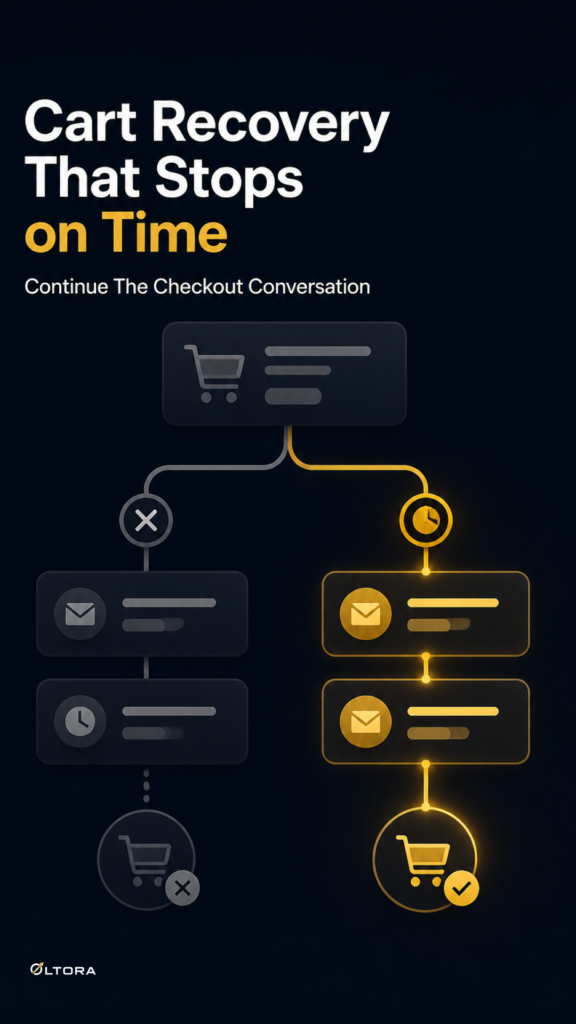
Automated recovery is better when the checkout flow repeats often enough that timing matters. Newsletter Pipe can support a sequence with an initial abandoned checkout reminder, a second follow-up after a delay, and a final reminder. If the order is completed, remaining reminders in that recovery journey can stop automatically. That makes the system feel more like a checkout safeguard than a separate marketing campaign.
For many WooCommerce stores, that is the real decision: do you want a reminder process that depends on attention, or one that depends on a configured event?
What makes a recovery journey useful instead of intrusive
A good abandoned cart path is not about sending more messages. It is about sending the right ones and stopping at the right moment. Three things help keep it usable.
- Clear entry point: The journey starts from an abandoned checkout event, not from a vague list rule.
- Defined rhythm: The reminder sequence can include an early reminder, a delayed follow-up, and a final message.
- Automatic stopping: Once the customer completes the order, the remaining reminders can be halted.
This structure matters because abandoned carts often sit in a narrow window. A customer may be distracted, compare options, or leave because checkout took too long. A reminder should bring them back to the purchase they already intended to make, not push them into a broader funnel that no longer matches their behavior.
Newsletter Pipe also keeps the workflow inside WordPress, where contacts, email sequences, journey organization, delivery history, and tracking records are stored in your site environment. For operators who want their customer follow-up to live alongside their store, that simplifies the setup.
Why a store may prefer WordPress-based recovery
There are good reasons to keep checkout recovery close to the store itself. A WordPress-based setup makes it easier to connect recovery with the rest of the site’s workflows. Newsletter Pipe can start journeys from WooCommerce purchases, specific product purchases, newsletter signups, selected Contact Form 7 forms, manual contact creation, and its own forms. That broader structure helps when abandoned cart recovery is only one part of customer follow-up.
For example, a store might use one journey for abandoned checkout reminders and another for post-purchase education. A buyer who completes the order can move into product guidance or retention messaging, while the abandoned cart path stops. That keeps the two customer states separate, which is exactly what you want when a checkout is either unfinished or complete.
If you want to see the product itself, the service page for Oltora Newsletter Pipe explains the WordPress email automation and abandoned cart capabilities in more detail.
Where the follow-up should start and where it should end
The cleanest abandoned cart setup is easy to describe:
- the customer begins checkout;
- the checkout is left unfinished;
- a reminder sequence starts;
- the order is completed or the sequence ends.
That simple flow is a better fit than sending a blanket campaign to everyone who ever browsed a product. It also avoids the common mistake of treating a cart reminder like a newsletter blast. A cart reminder should reference an active checkout event and respect the fact that the customer may still return on their own.
Newsletter Pipe is designed for that sort of event-aware workflow. It can power follow-up journeys based on abandoned checkout behavior, while also stopping reminders when the purchase is completed. For a store owner, that means less manual checking and a clearer line between an open cart and a finished sale.
When this setup makes the most sense
Abandoned cart recovery is most useful when your WooCommerce checkout has enough traffic that missed orders are a recurring issue, but you still want the follow-up to stay controlled. It also makes sense if you already manage email inside WordPress and want the recovery process to sit beside your other journeys instead of in a separate system.
If you only need an occasional personal follow-up, a manual process may be enough. If abandoned checkouts happen often, or if you want reminders that can start and stop according to actual checkout events, an automated WordPress journey is easier to maintain.
The practical advantage is not volume for its own sake. It is having a recovery path that matches the state of the order. That is what makes abandoned cart follow-up feel timely rather than random.
For stores that want checkout recovery to behave like part of the store workflow, Newsletter Pipe gives WooCommerce owners a way to use abandoned checkout events, send a short reminder sequence, and stop the follow-up once the order is complete.