
Custom Development
How to keep consent choices editable after the first click in WordPress
Aug
The problem: a consent choice should not feel permanent
A cookie banner does its job only once a visitor has made a choice. If that choice is hard to revisit, the site ends up with a frustrating gap: the banner disappears, but the setting feels buried. The better pattern is simple. Show a clear initial decision, then leave a small, easy-to-find settings control behind so visitors can change their mind later.
That matters on WordPress sites where consent is part of a real workflow, not just a one-time screen. People may reject optional categories first and accept later, or they may want to review what they allowed after reading more of the site. The page should not force them to hunt through the footer or reload the whole experience just to reopen preferences.
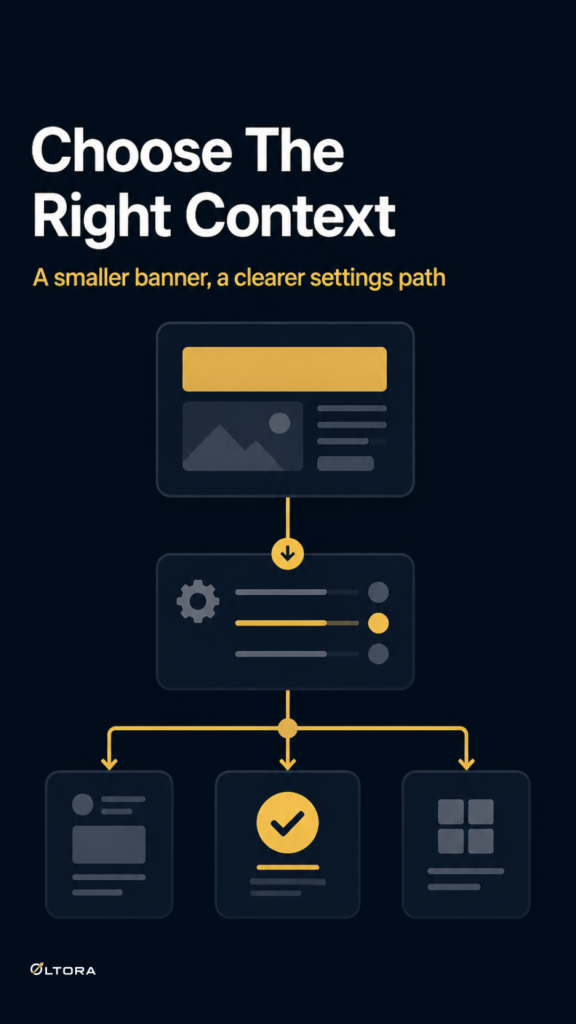
A lightweight banner such as LCP Cookies Lightning is built around that kind of handoff: the main banner asks for the decision, then a compact Cookie Settings control remains available after the choice is saved.
What a usable consent flow needs after the first click
The first screen is only part of the experience. After that, the site needs a way to keep the choice accessible without putting the banner back in the visitor’s way.
- The initial banner should be small and clear.
- The saved choice should dismiss the main banner.
- A separate settings control should stay available.
- That control should reopen preferences without restarting the whole consent flow.
This is the practical difference between a banner that simply disappears and a consent setup that remains usable. Visitors do not need to see the full banner again every time. They need a simple way to return to settings if they change their mind.
Keep the settings control visible, not dominant
If the settings control is too prominent, it starts competing with the page. If it is too hidden, nobody finds it. The sweet spot is a small persistent control that sits outside the main content and stays available after the first choice is saved.
That approach helps in three common situations:
- A visitor rejects optional categories now and wants to revisit them later.
- A visitor accepts everything quickly, then wants to review the decision.
- A returning visitor wants to change preferences without reading the banner again.
In each case, the site avoids an awkward reset. The consent interface becomes something the visitor can use again, instead of a one-time interruption that disappears into the page structure.
Separate the first decision from the later edit
One reason consent setups become confusing is that they try to make one interface do two different jobs at the same time. The first job is to collect the decision. The second job is to let the visitor revisit that decision later. Those are related, but they do not need the same visual weight.
A cleaner structure is:
- Ask for the choice with a compact banner.
- Save the preference.
- Remove the main banner from view.
- Leave a small settings trigger available for later edits.
That sequence keeps the site readable. The page can move on, but the choice is still reachable. On a WooCommerce store or a business site, that helps the consent layer feel like part of the site’s controls rather than another obstacle to content.
Why opt-in behavior makes editability more important
Optional consent categories are not automatically accepted. That means the initial response matters, especially when the visitor chooses to allow only some categories. If the site makes later changes difficult, the original decision can feel overly rigid.
Keeping the choice editable helps because it gives the visitor a real path back to the settings they already saw. That is useful when consent categories are handled through a WordPress-compatible workflow and the site wants the visitor’s decision to remain understandable after the banner is gone.
The point is not to make the banner bigger. The point is to make the preference persistent and revisitable.
What to avoid
Several common setups make consent editing harder than it needs to be:
- Hiding the settings entry completely after the first choice.
- Forcing visitors to reopen the full banner from scratch.
- Making the control so small or tucked away that it is effectively invisible.
- Putting the settings trigger inside a cluttered layout where it blends into unrelated page elements.
These choices do not usually improve clarity. They just move the problem later in the visit. A visitor who cannot find the settings again may assume the site does not provide them.
How to judge whether your current setup is working
If you already have a cookie banner, check the experience from a visitor’s perspective. After making a choice, can you still find a small settings control without searching the whole page? Can you reopen the preferences without reloading the banner as if it were the first visit? Does the control stay available without taking over the layout?
If the answer to any of those questions is no, the consent flow is probably too fragile. It may collect a decision, but it does not really support one.
That is where a performance-first banner can help. LCP Cookies Lightning keeps the initial interface compact and leaves a Cookie Settings control available after the saved choice, so the visitor can return to preferences without turning consent into a heavier page element.
A practical standard to aim for
Good consent UX is not complicated. The banner should be easy to read, the saved choice should stick, and the edit path should stay visible. If the settings control is clear enough to find later and light enough not to compete with the page, the site has a workable setup.
That is the standard to aim for: one clear decision, one small place to return to, and no need to rebuild the whole banner just to change a preference.