
LCP Cookies Lightning – Lightweight Cookie Consent Plugin for WordPress
Original price was: $19.99.$6.99Current price is: $6.99.
A performance-first WordPress consent banner for WP Consent API and Google Consent Mode.
Description
LCP Cookies Lightning is a lightweight WordPress cookie consent plugin designed to collect visitor consent without turning your privacy banner into another
performance problem.
Built by Oltora.com, the plugin works directly with WP Consent API and can integrate with Google Site Kit Consent Mode when Site Kit is installed.
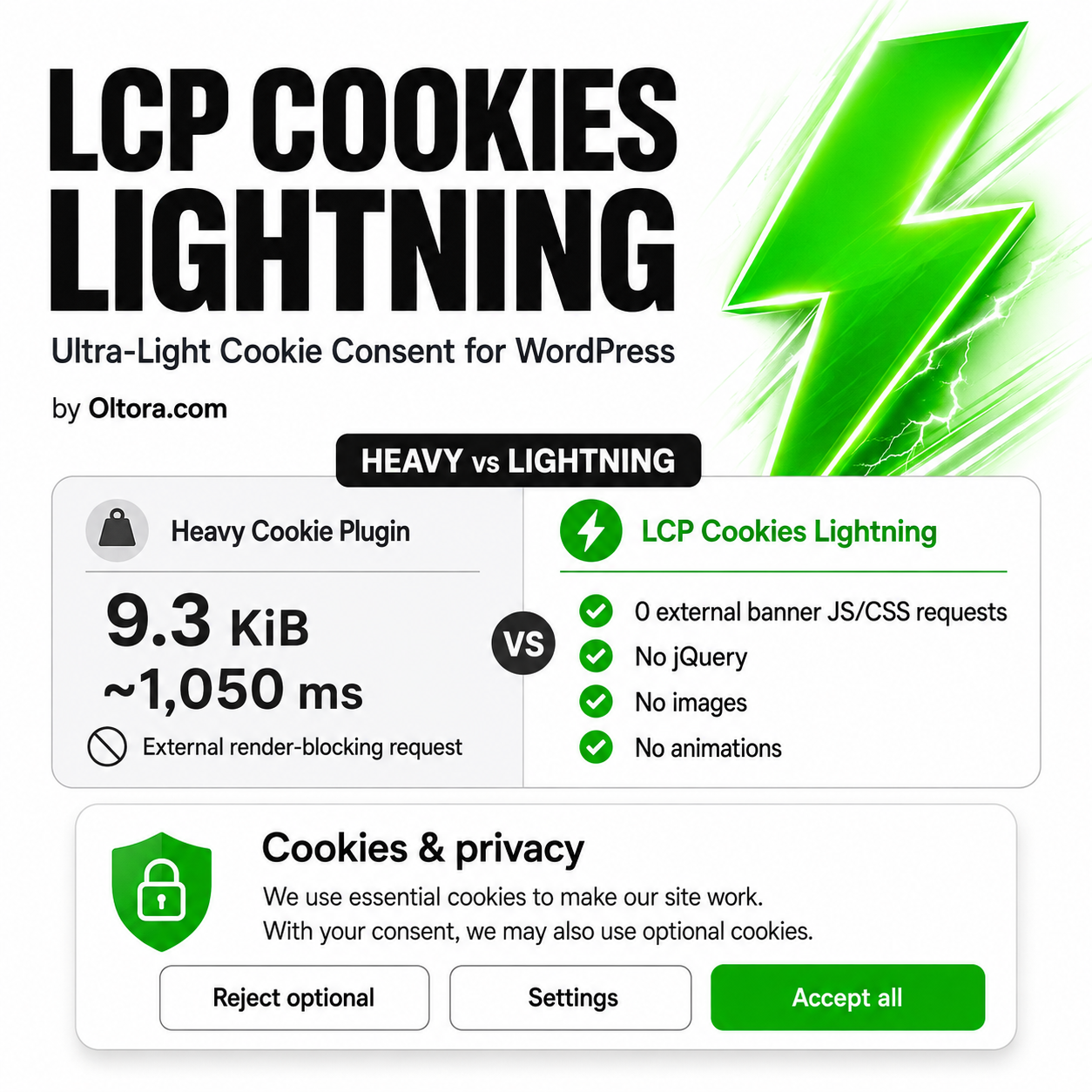
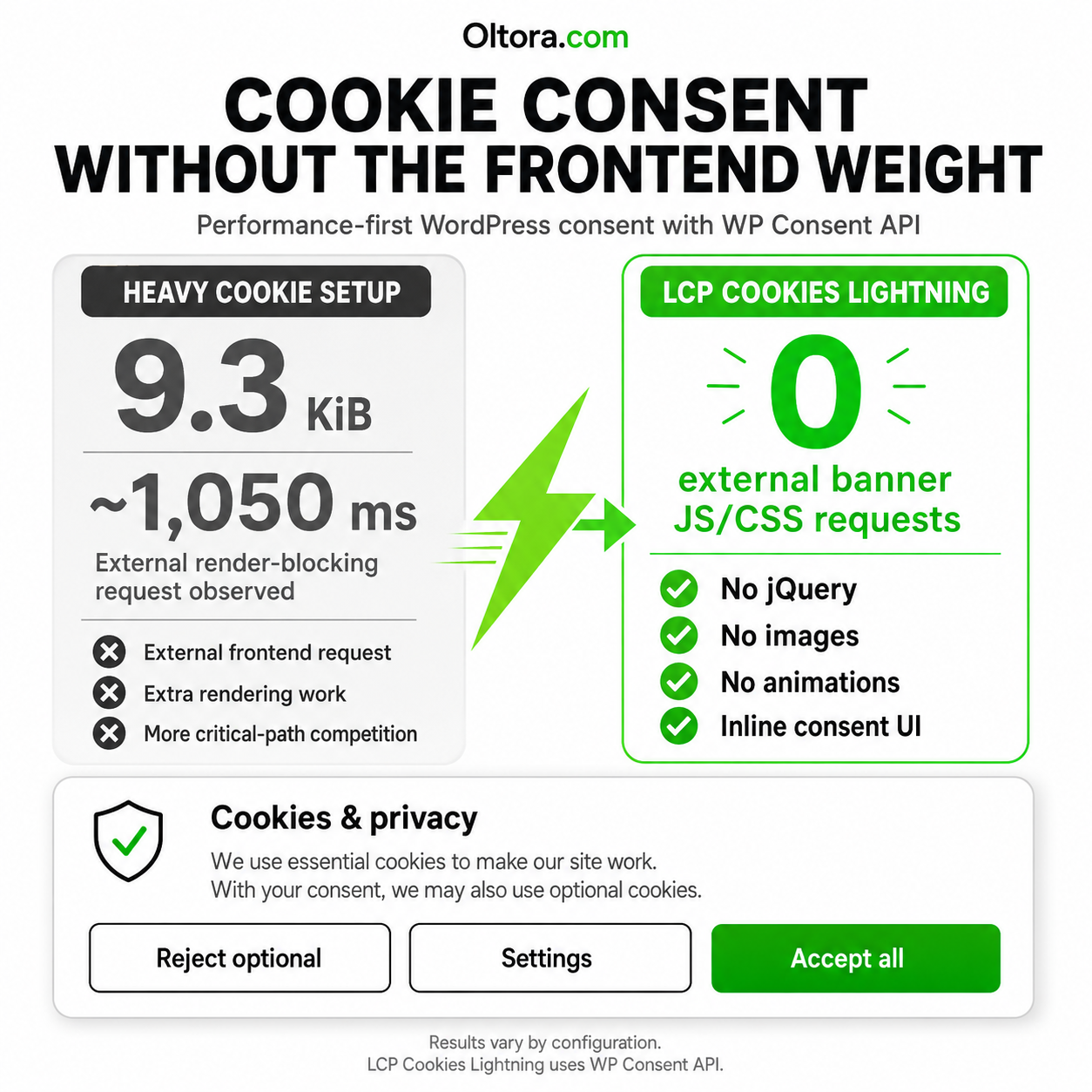
No popup framework. No external banner JavaScript. No external banner CSS.
No jQuery. No images. No animation.
A Lightweight WordPress Cookie Consent Plugin Built for Performance
Cookie consent is necessary on many websites, but the consent interface itself should not become one of the slowest elements on the page.
Many full consent-management platforms include cookie scanning, vendor databases, geolocation, consent records, legal-document tools and remote management services.
Those features can be valuable for websites that need them.
LCP Cookies Lightning takes a different approach.
It focuses on one job:
providing a fast, clear WordPress consent interface through WP Consent API with the smallest practical frontend footprint.
Keep the Consent Banner Out of Your Critical Rendering Path
A cookie banner can affect page performance when it introduces additional scripts, stylesheets, fonts, images, animations or delayed popup logic before the page has
finished rendering.
LCP Cookies Lightning was deliberately designed without those dependencies.
- No plugin-owned external JavaScript request for the banner
- No plugin-owned external CSS request for the banner
- No jQuery dependency
- No image requests
- No icon libraries
- No web fonts
- No animation library
- No delayed popup
- No remote banner CDN
Its compact styles and consent logic are delivered inline and work with the WP Consent API frontend architecture already present on the website.
Designed Around Core Web Vitals
LCP Cookies Lightning was developed after testing how consent and popup systems can affect real Lighthouse performance measurements.
The banner uses a fixed-position interface rather than inserting a large block into the normal page layout.
Designed to Avoid Layout Shift
Because the banner is positioned independently from the normal document flow, it does not need to push the page content downward when it appears.
This architecture is designed to reduce the risk of consent UI contributing to Cumulative Layout Shift (CLS).
Designed Not to Become the Page LCP
LCP Cookies Lightning does not use a large consent image, delayed popup content or animation that can unexpectedly become the page’s Largest Contentful Paint (LCP).
The consent interface is deliberately small so the main content of your page can remain the main content of your page.
Compact Cookie Banner Instead of a Full-Screen Interruption
The initial consent interface is intentionally small and non-intrusive.
When sufficient screen width is available, the three primary actions stay on one line:
Reject Optional → Settings → Accept All
Visitors can make a decision without being forced through a large modal window.
After a choice is saved, the main banner disappears and a small Cookie Settings control remains available so preferences can be changed later.
WP Consent API Is the Core Integration
LCP Cookies Lightning does not require Google Site Kit.
The required integration is WP Consent API.
WP Consent API provides a standardized way for compatible WordPress plugins to communicate visitor consent categories.
LCP Cookies Lightning acts as the visitor-facing consent manager and communicates the resulting choices through that API.
Consent Categories
The plugin currently communicates the standard consent categories:
- Functional
- Preferences
- Statistics Anonymous
- Statistics
- Marketing
LCP Cookies Lightning uses an opt-in model, so optional categories are not treated as accepted until the visitor explicitly allows them.
Works with Google Site Kit Consent Mode
Google Site Kit is optional.
If your WordPress website already uses Google Site Kit for Google Analytics or other supported Google services, you can enable Site Kit Consent Mode.
The resulting architecture is:
Visitor → LCP Cookies Lightning → WP Consent API → Google Site Kit Consent Mode
LCP Cookies Lightning deliberately does not add a second competing
gtag('consent') implementation when Site Kit is responsible for
Google Consent Mode.
This keeps responsibility clearly separated:
- LCP Cookies Lightning collects the visitor choice
- WP Consent API communicates that choice
- Site Kit manages supported Google tag consent behavior
Google Site Kit Is Optional
You can use LCP Cookies Lightning without Google Site Kit.
Any WordPress plugin that properly supports WP Consent API can consume the same consent states.
If a third-party integration does not support WP Consent API, however, it may require separate blocking or consent logic.
LCP Cookies Lightning does not pretend that a single WordPress API can automatically
control every external script on the internet.
LCP Cookies Lightning vs CookieYes
LCP Cookies Lightning and CookieYes are not identical products.
CookieYes is a broader consent-management platform offering functionality such as cookie scanning, managed consent workflows, geolocation and other compliance features.
LCP Cookies Lightning is intentionally narrower.
Its focus is:
WordPress consent communication with minimal frontend overhead.
| Selected Feature | LCP Cookies Lightning | CookieYes / Full CMP Platform |
|---|---|---|
| WordPress cookie consent banner | Yes | Yes |
| WP Consent API architecture | Core integration | Integration dependent |
| Google Site Kit required | No | No |
| Works with Site Kit Consent Mode | Yes | Available depending on configuration |
| Plugin-owned external banner JavaScript request | No | Platform dependent |
| Plugin-owned external banner CSS request | No | Platform dependent |
| jQuery required by consent banner | No | Platform dependent |
| Banner images required | No | Platform dependent |
| Opening animation required | No | Platform dependent |
| Cookie scanning | No | Yes |
| Geolocation rules | No | Available |
| Consent records / cloud dashboard | No | Available |
| Primary focus | Performance and simplicity | Full consent-management platform |
Comparison refers only to selected product characteristics and publicly documented
features. Full CMP platforms provide additional functionality that LCP Cookies
Lightning deliberately does not attempt to reproduce.
A Real Lighthouse Development Case
LCP Cookies Lightning was developed while optimizing a real WooCommerce website and measuring consent-related frontend behavior with Lighthouse Mobile.
In one test configuration, a CookieYes CDN script appeared in the render-blocking request report at approximately:
- Transfer size: 9.3 KiB
- Reported request duration: approximately 1,050 ms
The lightweight replacement architecture used by LCP Cookies Lightning creates no equivalent external CSS or JavaScript request for its consent banner.
This does not mean CookieYes will always add 1,050 ms to every website.
Performance depends on network conditions, configuration, location, caching, other WordPress plugins and the individual Lighthouse test run.
The measurement is included to explain why LCP Cookies Lightning was built, not to present a universal benchmark for another product.
Lightweight by Architecture, Not by Marketing Label
“Lightweight” is often used as a marketing term.
For LCP Cookies Lightning it describes specific architectural choices.
No Additional Banner Framework
The plugin does not load a frontend framework to display three consent buttons.
No Remote Banner Assets
The consent interface does not require a remote CSS or JavaScript file from an
Oltora server.
No External Font or Image Dependency
The banner uses system fonts and plain interface elements.
No Artificial Display Delay
There is no three-second timer, entrance animation or delayed popup sequence.
No Normal-Flow Layout Reservation
The compact fixed-position banner is designed not to push the website content
around when it appears.
Built for WordPress Performance-Focused Websites
LCP Cookies Lightning can be useful for:
- WooCommerce stores
- WordPress business websites
- Performance-focused blogs
- Developers optimizing Core Web Vitals
- Agencies managing lightweight WordPress installations
- Sites already using WP Consent API
- Sites using Google Site Kit Consent Mode
Why Choose LCP Cookies Lightning?
Minimal Frontend Footprint
Collect visitor consent without introducing another large frontend application.
WP Consent API Native Architecture
Use WordPress’s consent communication layer instead of creating an isolated
consent state that other plugins cannot read.
Google Site Kit Optional
Use the plugin with or without Google Site Kit.
If Site Kit is installed, its Consent Mode integration can consume compatible
WP Consent API consent states.
Core Web Vitals Conscious
The banner architecture is designed to avoid unnecessary LCP candidates,
layout shifts, animations and remote banner assets.
Clear Visitor Choices
Reject optional cookies, customize Analytics and Marketing, or accept all
without navigating through a full-screen privacy interface.
Preferences Can Be Changed Later
After making a selection, visitors can reopen their consent preferences through
the small Cookie Settings control.
What LCP Cookies Lightning Does Not Replace
LCP Cookies Lightning is not positioned as a complete enterprise CMP.
The plugin currently does not provide:
- Automatic cookie scanning
- Automatic legal-document generation
- Consent-log databases
- Cloud consent dashboards
- Automatic geolocation rules
- IAB TCF vendor management
- Automatic blocking of every third-party script
Those are different product categories and may require a full consent-management
platform.
Third-Party Scripts Still Need to Respect Consent
WP Consent API provides a standardized communication layer between compatible
WordPress components.
It is not a universal JavaScript blocker.
If another plugin independently loads an external script, iframe, payment component
or tracking service without consulting WP Consent API, that integration may require
separate handling.
This distinction is especially important for payment widgets, chat systems,
embedded content and other third-party integrations.
Technical Requirements
- WordPress: 6.5 or later
- Tested up to: WordPress 7.1
- PHP: 7.4 or later
- Required plugin: WP Consent API
- Optional integration: Google Site Kit Consent Mode
Frequently Asked Questions
What does LCP Cookies Lightning do?
LCP Cookies Lightning displays a compact cookie consent interface and communicates
visitor choices to compatible WordPress components through WP Consent API.
Does LCP Cookies Lightning require Google Site Kit?
No.
The required dependency is WP Consent API.
Google Site Kit is optional.
Why would I use Google Site Kit with LCP Cookies Lightning?
If you use supported Google services through Site Kit, enabling Site Kit Consent Mode
allows Site Kit to react to consent information communicated through WP Consent API.
Can I use LCP Cookies Lightning without Google Analytics?
Yes.
The plugin is not tied specifically to Google Analytics.
Does the plugin use jQuery?
No.
The consent interface has no jQuery dependency.
Does LCP Cookies Lightning load an external CSS file?
No external banner stylesheet is created by the plugin.
Its small interface styling is delivered inline.
Does LCP Cookies Lightning load an external JavaScript file?
The plugin does not create its own external JavaScript request for the consent
interface.
Its small consent logic works with the WP Consent API frontend script already
present on the site.
Does it contain images, icons or web fonts?
No.
The consent interface does not depend on images, icon libraries or web fonts.
Does it automatically scan my website for cookies?
No.
LCP Cookies Lightning is deliberately not a cookie-scanning platform.
Does it automatically block every third-party tracking script?
No.
Third-party integrations must support WP Consent API or require separate blocking
logic.
Can visitors reject optional cookies?
Yes.
The banner provides a clearly visible Reject Optional action.
Can visitors select Analytics without Marketing?
Yes.
The Settings panel allows Analytics and Marketing preferences to be controlled
separately.
Can visitors change their choice later?
Yes.
A small Cookie Settings control remains available after the initial decision.
Will the cookie banner move my page content?
The interface uses fixed positioning rather than reserving normal page-layout
space and is specifically designed to minimize the risk of layout shift.
Is LCP Cookies Lightning a GDPR compliance guarantee?
No.
LCP Cookies Lightning is a technical consent interface, not legal advice and not
a guarantee of compliance with GDPR, UK GDPR, ePrivacy, CCPA/CPRA or any other law.
Website owners remain responsible for identifying their cookies and tracking
technologies, configuring appropriate blocking behavior and maintaining accurate
privacy documentation.
Updates and Support
Your LCP Cookies Lightning purchase includes the plugin package and access to the
version supplied with your purchase.
Cookie Consent Without the Frontend Weight
Privacy controls should help your visitors make a decision without becoming another
obstacle to the page they came to visit.
LCP Cookies Lightning provides a compact WordPress consent interface built around WP Consent API, lightweight frontend architecture and practical Core Web Vitals considerations.
WP Consent API → Clear visitor choices → Optional Google Site Kit integration →
Minimal frontend overhead.
Related products