



Banneretor – Custom Banner Plugin for WordPress & WooCommerce
$12.99
Banneretor lets you create and assign custom banners to WordPress pages, posts, WooCommerce products and categories.
Choose an image-and-text layout, a four-image grid or a complete banner image. Position images on the left or right, display banners full width or centered, edit text directly in WordPress and duplicate existing banners in one click.
$12.99 one-time payment · Unlimited websites · Lifetime license · Lifetime updates · No subscription
Description
Create a Different Banner for Every Page
Banneretor is a custom banner plugin for WordPress and WooCommerce that lets you create, manage and assign banners to different areas of your website.
Instead of showing the same banner everywhere, you can use a different design for each page, post, product or category.
Create the banner, choose where it should appear and publish it directly from WordPress.
Custom Banners for WordPress and WooCommerce
Banneretor allows you to assign banners to:
- WordPress pages
- Blog posts
- WooCommerce products
- WooCommerce product categories
- WordPress categories
- Supported public taxonomies
- WooCommerce shop and archive areas
You can create a unique banner for one specific page or reuse the same banner in multiple locations.
Choose the Banner Layout
Image and Text
Create a two-column banner with an image on one side and editable WordPress text on the other.
You can place the image on the left or right and choose a full-width or centered layout.
Four-Image Grid and Text
Display four images in a visual grid next to a separate text area.
This layout is ideal for product collections, category introductions, portfolios, seasonal campaigns and brand presentations.
Image-Only Banner
Already have a complete banner design?
Upload the finished graphic and display it as an image-only banner.
Edit Banner Text Directly in WordPress
Banneretor keeps the text separate from the image, so you can update your message without recreating the entire graphic.
Use the WordPress editor to add:
- Headings
- Paragraphs
- Links
- Lists
- Bold and italic text
- Calls to action
Full-Width or Centered Banners
Choose how the banner should fit your website.
Use a full-width background for a stronger visual impact or keep the banner inside the main content width for a more compact design.
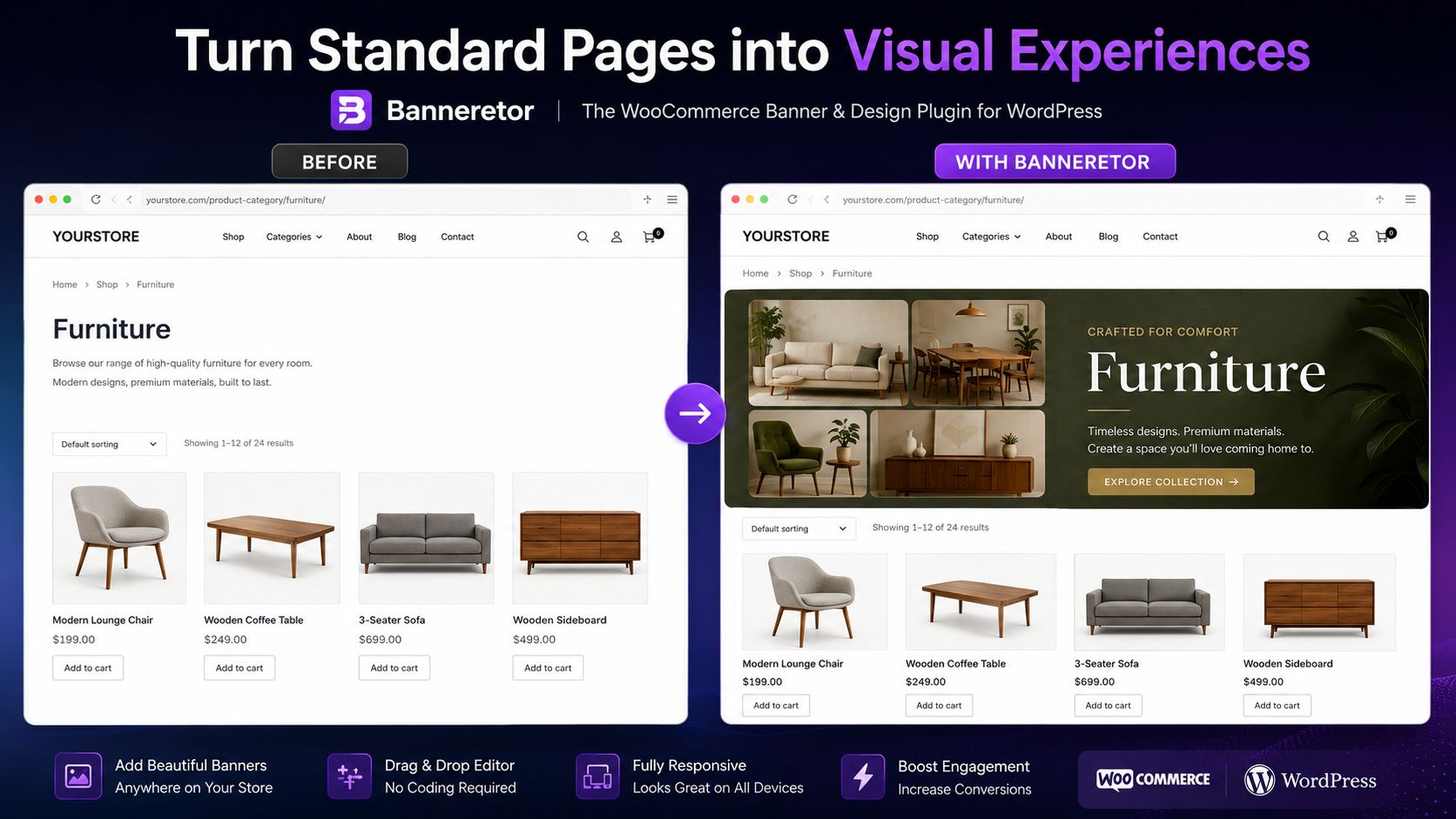
Perfect for WooCommerce Categories
Standard WooCommerce category pages often include only a title, a short description and a product grid.
Banneretor helps you create a more professional introduction using images, editable text and a dedicated layout.
Use it to present:
- Product collections
- Seasonal promotions
- Category concepts
- Featured products
- Brand messages
- Special campaigns
Duplicate Existing Banners
Use the Copy Banner feature to duplicate an existing design.
Keep the same layout, replace the images, update the text and assign the copied banner to another page, product or category.
Simple Banner Management
Banneretor works directly inside the WordPress administration area.
You can create banners, choose images from the Media Library, edit text, configure the layout and assign each banner without using an external platform.
The plugin administration interface is available in English and Italian.
What You Get
- Banneretor WordPress plugin
- WordPress and WooCommerce support
- Different banners for pages, posts, products and categories
- Image-and-text layout
- Four-image grid layout
- Image-only layout
- Full-width and centered banners
- Left or right image positioning
- Editable WordPress text
- Copy Banner feature
- English and Italian administration interface
- Unlimited website usage
- Lifetime license
- Lifetime updates
- No recurring subscription
Give Every Page the Right Banner
Stop using the same generic banner across your entire website.
Create targeted visual sections for pages, products, articles and categories with Banneretor.
Get Banneretor for $12.99 with a one-time payment.
Unlimited Websites · Lifetime License · Lifetime Updates · No Subscription
Related products