
Oltora Inbox – WordPress Email Inbox Plugin for Business & WooCommerce
Original price was: $99.00.$79.00Current price is: $79.00.
Read and reply to your real business email directly inside WordPress. Connect your existing IMAP/SMTP mailbox and, with WooCommerce, instantly see the customer’s orders, total spent and purchased products beside the conversation.
Description
Manage your business email directly inside WordPress
Why leave WordPress every time you need to check your business email?
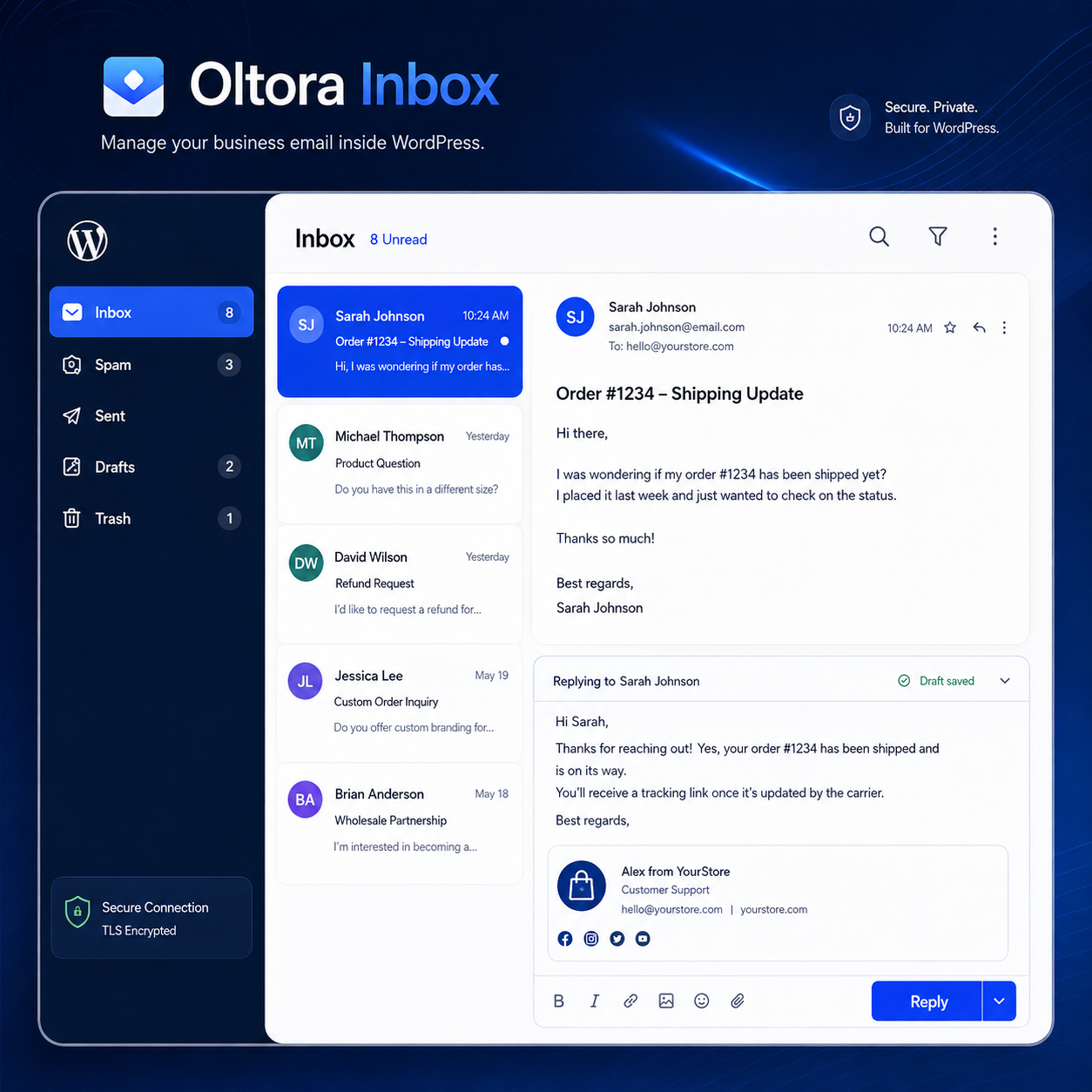
Oltora Inbox brings your existing business mailbox directly into your WordPress dashboard, so you can read messages, reply to customers, compose new emails, manage drafts and access your mailbox folders without constantly switching between WordPress, webmail and desktop email applications.
Oltora Inbox does not replace your email provider and does not create a new mailbox.
Instead, it securely connects WordPress to the business email account you already use through IMAP and SMTP.
Your mailbox stays with your current email provider. Oltora Inbox simply gives you a convenient way to manage it from WordPress.
Your WooCommerce customer emails, with their orders right beside them
When a customer contacts your business, the email itself is often only part of the story.
If you run WooCommerce, you may also need to know:
- who the customer is;
- what they purchased;
- how many orders they placed;
- how much they spent;
- the status of their latest order; and
- which order they may be contacting you about.
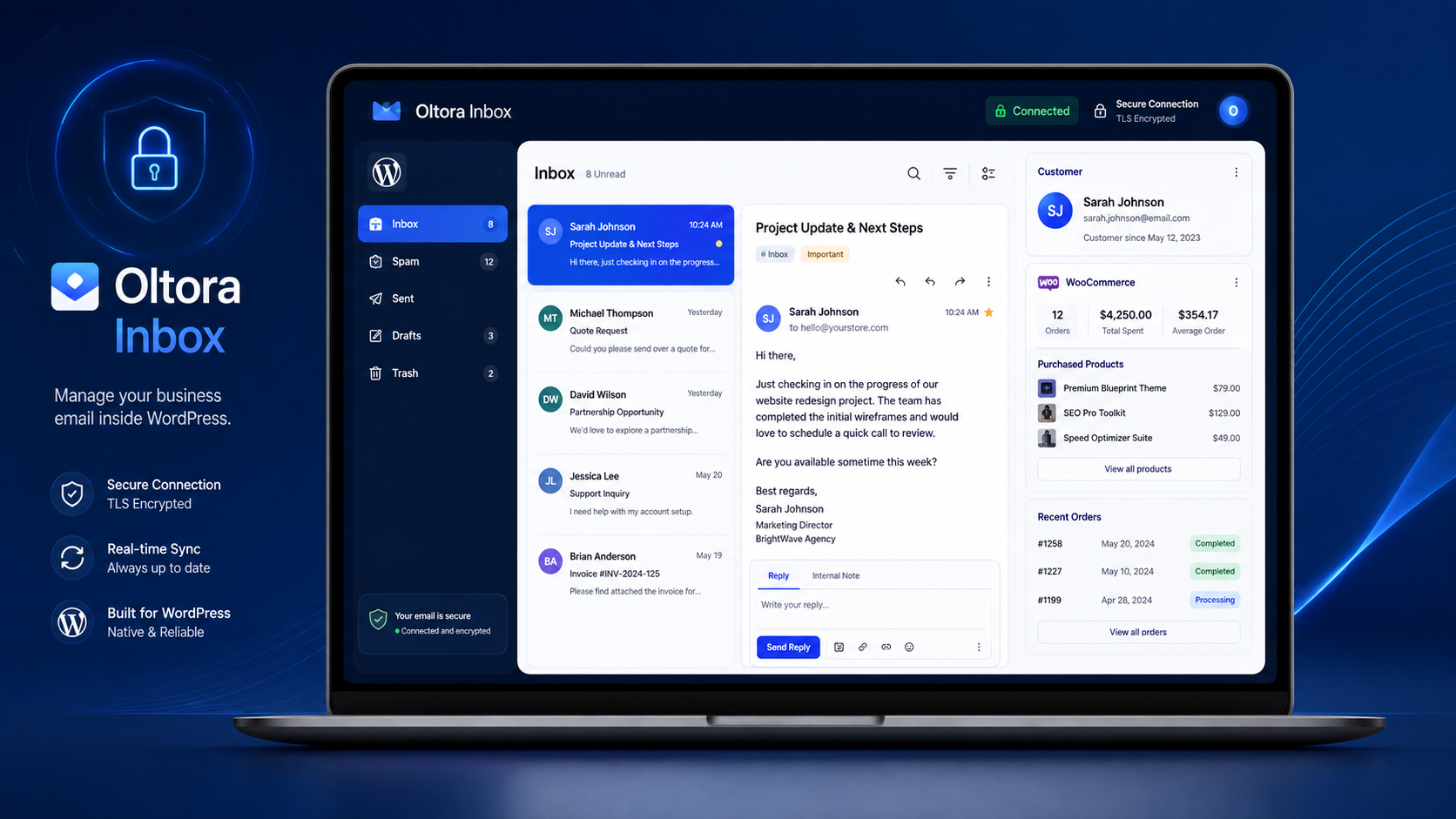
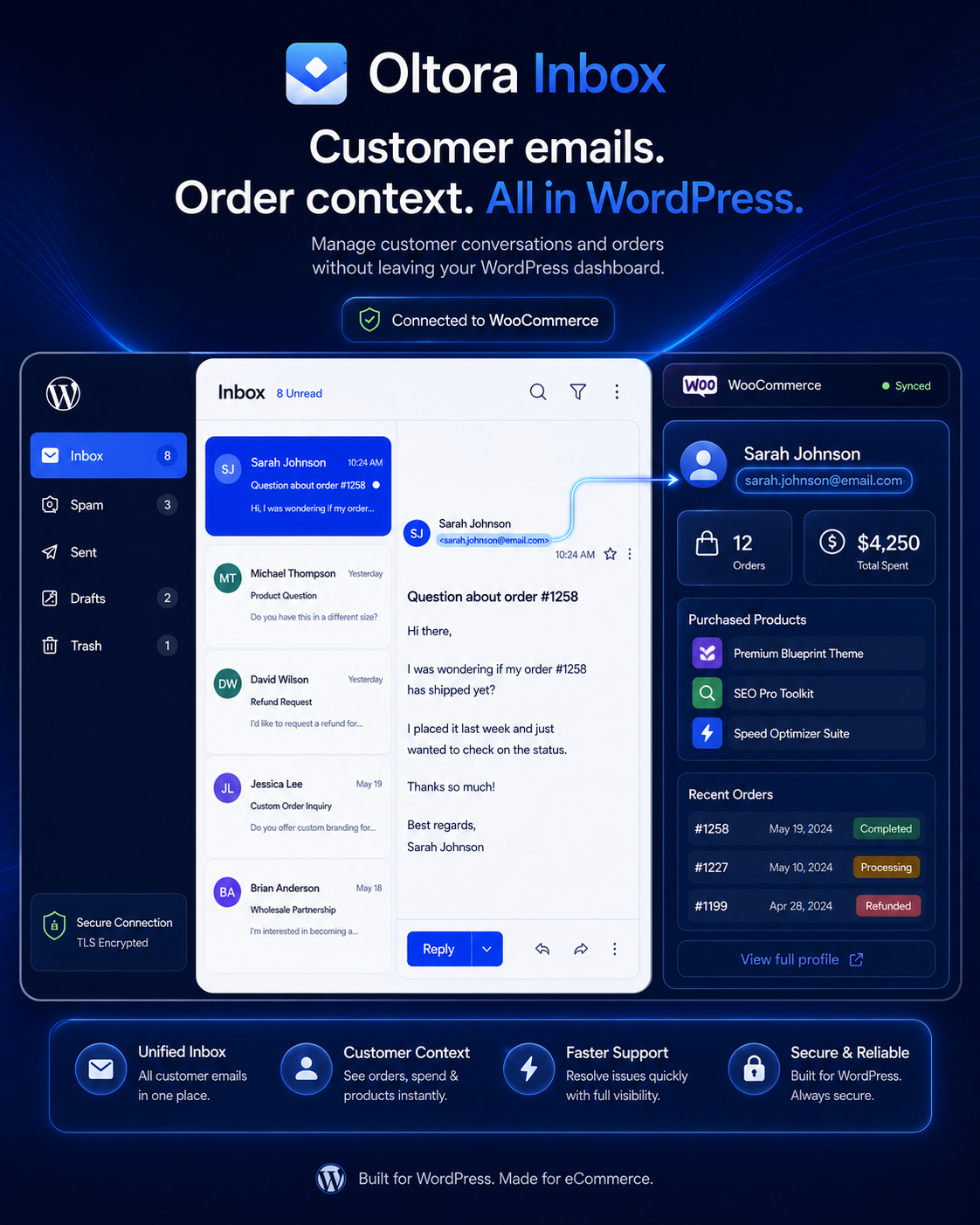
Oltora Inbox can display relevant WooCommerce customer and order information directly beside the email conversation.
Instead of moving between your mailbox and WooCommerce to understand who is contacting you, the context you need can already be available on the same screen.
Read the message. Understand the customer. Reply with context.
A real WordPress email inbox, not just an email log
Many WordPress email plugins are designed primarily to send website notifications or record outgoing WordPress emails.
Oltora Inbox is built for something different:
accessing and managing your real business mailbox from inside WordPress.
Depending on the folders provided by your email service, you can work with:
- Inbox;
- Spam;
- Sent;
- Drafts;
- Trash; and
- Templates.
You can open an email, read the conversation and continue working without leaving your WordPress administration area.
Read, reply and send business email from WordPress
Oltora Inbox provides the everyday tools you need to work with your business mailbox directly from WordPress.
You can:
- read incoming email;
- compose new messages;
- reply to messages;
- use the sender’s Reply-To address when available;
- forward emails;
- mark messages as read or unread;
- delete messages;
- browse mailbox folders;
- download incoming attachments; and
- send attachments with outgoing messages.
When you reply to an email, Oltora Inbox automatically prepares the recipient and the information required to continue the conversation.
Handle customer communication where you already manage your website.
Automatically save email drafts while you write
Writing a reply and need to check something else in WordPress?
Oltora Inbox automatically saves your work as a draft after you begin editing a message.
If you leave the composer and return later, you can open the Drafts folder and continue from the saved version.
Drafts are stored in the actual Drafts folder of your connected mailbox rather than being kept as a separate hidden collection inside WordPress.
This provides a more familiar email workflow while helping protect unfinished messages from being accidentally lost.
Create your own reusable email signature
Your business emails should look like they come from your business.
Oltora Inbox includes an email signature and footer setting that can be:
- created;
- saved;
- edited;
- enabled or disabled; and
- removed.
When enabled, your signature can automatically be added to outgoing messages.
Add your name, company details, contact information or another appropriate business footer once and reuse it whenever you communicate from WordPress.
See WooCommerce customer information beside the email
If you run a WooCommerce store, Oltora Inbox can turn an ordinary customer email into useful business context.
When the sender’s email address matches WooCommerce customer or order information, Oltora Inbox can display relevant customer details beside the message.
You can quickly see information such as:
- how many orders the customer has placed;
- how much the customer has spent;
- which products the customer purchased;
- recent WooCommerce orders;
- order status;
- order totals; and
- links to the related customer or order where available.
Imagine receiving:
“Hi, I have a question about the product I ordered last week.”
Instead of opening another tab, searching WooCommerce and trying to identify the customer manually, the relevant purchase information can already be available next to the conversation.
One message. One customer. The context you need on the same screen.
Built for WooCommerce stores that do not need another help desk
Not every business needs a complex ticketing platform.
Sometimes you simply want to receive a customer’s email, understand what they purchased and reply using the email address your business already uses.
Oltora Inbox can be especially useful for WooCommerce businesses that regularly receive questions about:
- orders;
- products;
- shipping;
- returns;
- product instructions;
- previous purchases; and
- customer service.
Instead of treating your mailbox and WooCommerce customer history as two completely separate systems, Oltora Inbox brings the relevant information together inside WordPress.
No new customer portal. No mailbox migration. No need to turn every email into a support ticket.
Keep using your existing business email address
You do not need to move your mailbox to Oltora.
If you currently use an address such as:
support@example.com
that address can continue to exist with your current email or hosting provider.
Oltora Inbox connects to that mailbox using its existing email connection details.
The basic workflow remains:
Incoming email:
Customer → your existing mail server → your mailbox
Oltora Inbox:
Your mailbox → secure IMAP connection → WordPress
Outgoing reply:
WordPress → your SMTP provider → customer
If you ever disable Oltora Inbox, your mailbox remains with your email provider.
Connect your mailbox with IMAP and SMTP
Oltora Inbox can attempt to detect standard mailbox connection settings automatically.
When manual configuration is required, Advanced Settings allow you to enter the connection information supplied by your email provider, including:
- email address;
- username;
- password or app password;
- IMAP server;
- IMAP port;
- SMTP server;
- SMTP port; and
- supported secure connection settings.
Connection testing is included so you can verify the mailbox configuration before using it.
Important: Oltora Inbox currently supports traditional IMAP/SMTP mailbox credentials and compatible provider app passwords. Accounts that require OAuth-only authentication may require a dedicated provider connector and are not supported by the current authentication method.
Your mailbox credentials are protected
Email can contain private and sensitive business information, so Oltora Inbox has been designed with mailbox security in mind.
Security measures include:
- encrypted mailbox credentials at rest;
- secure SSL/TLS or STARTTLS connections;
- administrator-level mailbox access by default;
- permission and request validation for sensitive actions;
- sanitization of incoming email HTML;
- remote image blocking to reduce external tracking;
- controlled attachment handling; and
- authenticated communication with the Oltora license service.
No software can guarantee that future vulnerabilities will never exist, so keeping WordPress, Oltora Inbox and your server software updated remains important.
Designed to avoid slowing down your public WordPress website
Oltora Inbox performs mailbox-related work inside its WordPress administration screens rather than continuously checking email during normal public page views.
Mailbox lists use batched IMAP requests where possible to reduce unnecessary communication with the email server.
WooCommerce customer information is loaded when relevant to the message being viewed and can be temporarily cached to avoid unnecessarily repeating the same queries.
The goal is simple:
provide a useful mailbox experience without turning every public website request into an email synchronization job.
Who is Oltora Inbox for?
Oltora Inbox is designed for WordPress users who want quicker access to their business email without constantly switching between different tools.
It can be useful for:
- WooCommerce store owners;
- small businesses;
- freelancers;
- consultants;
- service businesses;
- online stores;
- website administrators; and
- business owners who manage most of their work from WordPress.
You do not need a complex help desk just to answer your business email.
Sometimes you simply want your inbox where your business already happens.
Oltora Inbox features
- real business email inbox inside WordPress;
- IMAP mailbox connection;
- SMTP email sending;
- Inbox folder;
- Spam folder;
- Sent folder;
- Drafts folder;
- Trash folder;
- Templates area;
- compose email;
- reply;
- forward;
- automatic recipient handling for replies;
- automatic draft saving;
- incoming attachment downloads;
- outgoing attachments;
- read and unread management;
- email signature and footer;
- WooCommerce customer recognition;
- WooCommerce order count;
- customer total spent;
- products purchased;
- recent order information;
- IMAP connection testing;
- SMTP connection testing;
- encrypted mailbox credentials;
- secure email transport support;
- English and Italian interface; and
- Oltora license and update integration.
One license. Lifetime access.
Your Oltora Inbox license is a lifetime license for one WordPress website.
The standard Oltora Inbox license includes:
- 1 WordPress website;
- 1 connected mailbox;
- lifetime license activation;
- lifetime Oltora Inbox plugin updates; and
- standard product support.
There is no annual software license renewal required to continue using Oltora Inbox under your lifetime license.
Buy Oltora Inbox once and keep using the licensed version on your activated website for the lifetime of the product.
Need hands-on help with your mailbox?
Standard product support is included with your Oltora Inbox license.
If you would like additional hands-on assistance with mailbox configuration, IMAP, SMTP, provider settings, connection troubleshooting or other advanced setup tasks, an optional annual assistance service is available separately.
Premium Assistance is an optional service and is not required to use Oltora Inbox.
System requirements
- a compatible WordPress installation;
- PHP 7.4 or newer;
- a working business email mailbox;
- IMAP access;
- SMTP access; and
- SSL/TLS or STARTTLS secure mailbox connectivity.
Produced by Oltora.com.
Frequently Asked Questions
What is Oltora Inbox?
Oltora Inbox is a WordPress business email plugin that connects your existing mailbox to the WordPress administration area using IMAP and SMTP.
Does Oltora Inbox create a new email account?
No. Oltora Inbox connects to an email mailbox you already have with your current email or hosting provider.
Can I read my business email inside WordPress?
Yes. Oltora Inbox is specifically designed to let you access and manage your connected mailbox from the WordPress dashboard.
Can I reply to emails from WordPress?
Yes. You can reply to messages and compose new emails using the SMTP connection associated with your mailbox.
What happens if I leave a reply before sending it?
Oltora Inbox automatically saves drafts after you begin editing. You can return to the Drafts folder and continue your message later.
Does Oltora Inbox work with WooCommerce?
Yes. When an email address can be associated with WooCommerce customer or order information, Oltora Inbox can display relevant commerce information beside the message.
Can I see what a customer purchased?
Yes. The WooCommerce customer panel can display purchased products, order information, total spent and the number of orders associated with the customer.
Does Oltora Inbox replace my existing webmail?
No. Your existing webmail and email applications can continue to work. Oltora Inbox simply provides another way to access the same mailbox from inside WordPress.
Are my email credentials stored in WordPress?
The connection credentials required by the plugin are stored in encrypted form using security material associated with the WordPress installation.
Does Oltora Inbox support Gmail or Microsoft accounts?
Accounts that allow traditional IMAP/SMTP credentials or compatible app passwords may work.
Accounts that require OAuth-only authentication are not supported by the current authentication method and may require a dedicated provider-specific connector.
Is the Oltora Inbox license annual?
No. Oltora Inbox is provided with a lifetime license for the licensed WordPress website.
There is no annual renewal required for the Oltora Inbox software license.
Are plugin updates included?
Yes. Oltora Inbox plugin updates are included with your lifetime license for the lifetime of the product, subject to the terms of the license.
What support is included with the license?
Standard product support is included with your Oltora Inbox license.
For customers who would like additional hands-on assistance with mailbox setup, provider-specific configuration, IMAP/SMTP troubleshooting or other advanced configuration tasks, the optional Premium Assistance service is available separately.
Do I need Premium Assistance to use Oltora Inbox?
No.
Premium Assistance is an optional service for customers who want additional hands-on technical help. It is not required to activate or use Oltora Inbox.
Can I continue using the plugin without purchasing Premium Assistance?
Yes. Your Oltora Inbox lifetime software license and Premium Assistance are separate.
Premium Assistance does not determine whether your Oltora Inbox license remains active.
Stop switching between WordPress and webmail
Your website, WooCommerce store and customers are already inside WordPress.
With Oltora Inbox, your business email can be there too.
Read your messages. See your customer’s WooCommerce history. Reply without leaving WordPress.
Oltora Inbox gives small businesses a simpler way to keep email communication close to the website they already manage every day.
Related products