
Searchetor Pro – WooCommerce Admin Product Search by SKU, ID & GTIN
$12.99
Searchetor Pro is a WooCommerce admin product search plugin that helps you find products by Title, Description, SKU, Product ID, GTIN / UPC / EAN / ISBN and more. Choose Contains, Starts With or Exact matching directly inside Products → All Products. $12.99 one-time payment for 1 website, with lifetime license and lifetime updates. No subscription.
Description
Find the Right WooCommerce Product Without Digging Through Irrelevant Results
You already know which product you’re looking for. The problem is finding it quickly inside WooCommerce.
Searchetor Pro is a WooCommerce admin product search plugin that gives you precise control over where WooCommerce searches and how closely a product must match your query.
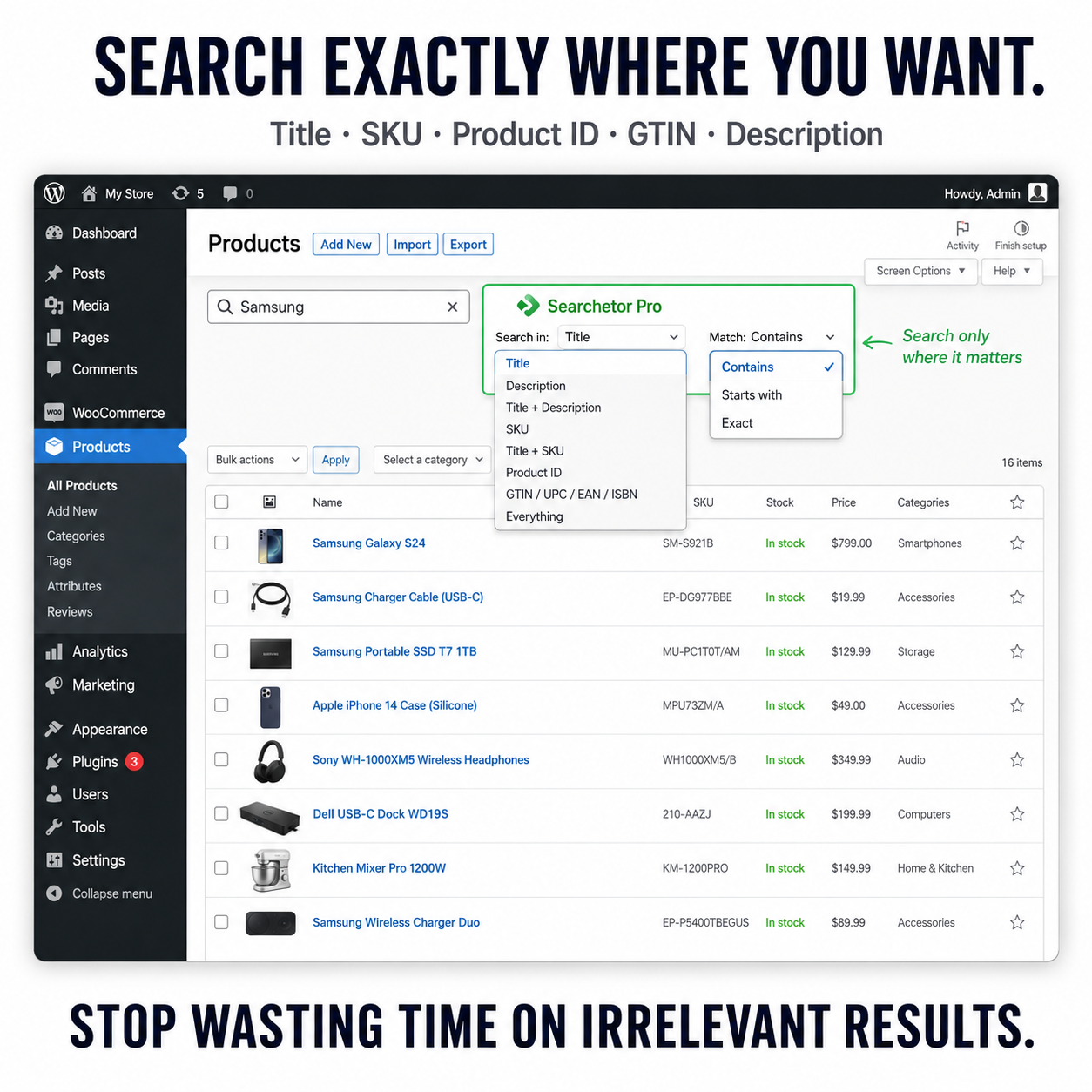
Search by product Title, Description, SKU, Product ID, GTIN / UPC / EAN / ISBN and more, directly inside the WooCommerce Products → All Products screen you already use.
No separate product manager. No new workflow. Just a better way to find the product you need.
Search Exactly Where the Product Data Lives
Instead of searching broadly through product data, Searchetor Pro lets you choose exactly where WooCommerce should look.
- Title – search only product names
- Description – search inside product descriptions
- Title + Description – search both fields together
- SKU – find products using their stock keeping unit
- Title + SKU – search product names and SKUs together
- Product ID – find a product directly from its WooCommerce ID
- GTIN / UPC / EAN / ISBN – search using product identifiers
- Everything – use a broader search when you need it
Choose How Precise the Search Should Be
Finding the right field is only part of the job. Searchetor Pro also lets you control how closely a product must match your search.
Contains
Find products where the selected field contains your search term.
For example, searching for Samsung in the Title field can return products with Samsung anywhere in their product name.
Starts With
Return products where the selected field begins with your search term.
Exact
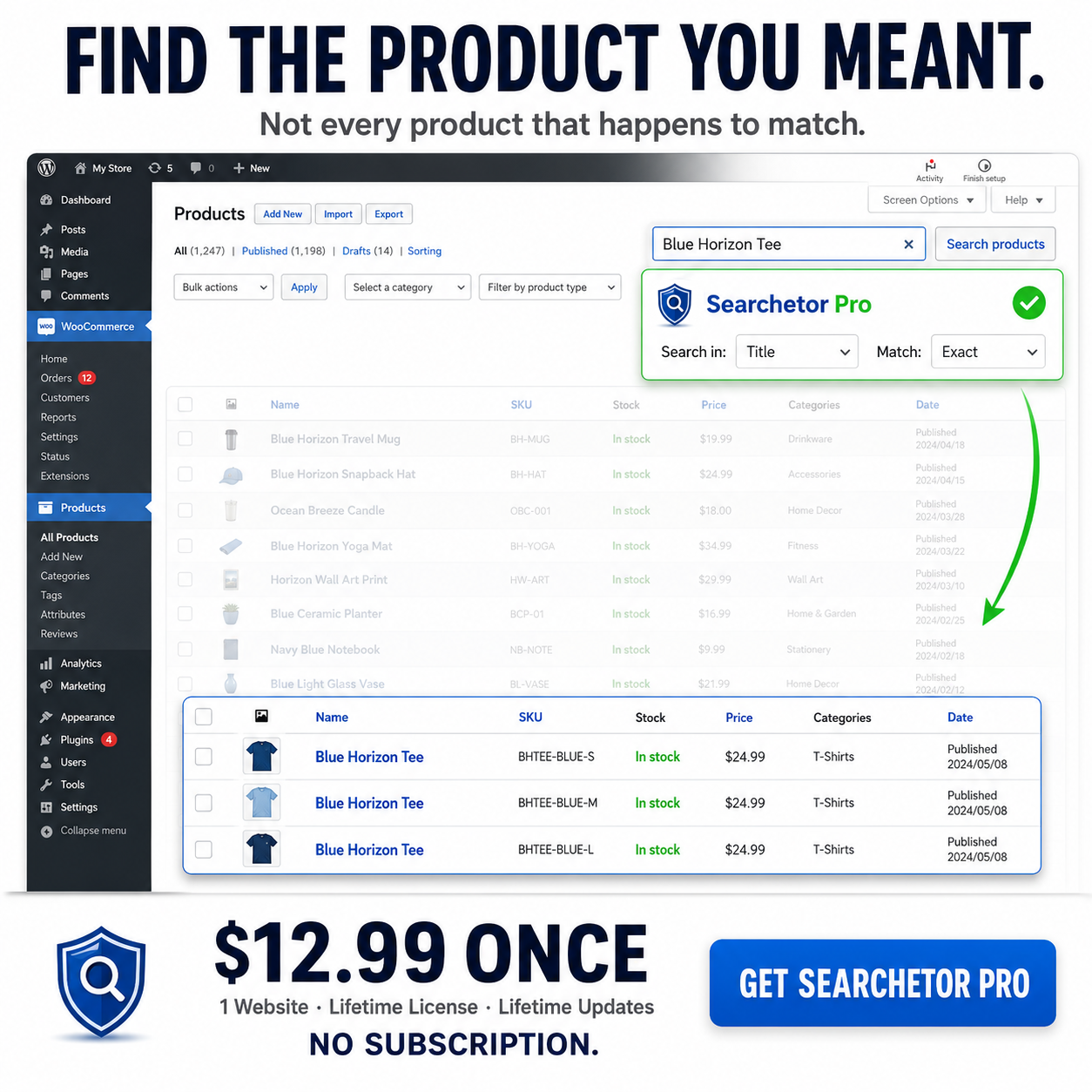
Use Exact matching when you already know precisely what you’re looking for, such as a SKU, Product ID, GTIN, UPC, EAN or ISBN.
Search WooCommerce Products by SKU
Know the SKU but don’t want to scan through unrelated products?
Choose Search in: SKU, enter the stock code and select the matching method you need.
For a specific SKU such as ABC-45821, selecting Exact lets you search specifically for that value instead of relying on a broader WooCommerce admin search.
Find WooCommerce Products by Product ID
If you already know the WooCommerce Product ID, Searchetor Pro lets you search for it directly.
This can be especially useful when working with orders, imports, exports, integrations, spreadsheets or other systems that reference WooCommerce products by ID.
Search Products by GTIN, UPC, EAN or ISBN
Product identifiers are often the fastest way to locate the exact item you need.
Searchetor Pro provides a dedicated search option for GTIN, UPC, EAN and ISBN, making it easier to locate products when you’re working with inventory data, supplier files, spreadsheets or external product records.
Same WooCommerce Products Screen. Better Search.
Searchetor Pro doesn’t replace your existing WooCommerce product management workflow.
It improves it.
The plugin works directly inside:
WooCommerce → Products → All Products
- No separate search dashboard
- No additional product management system
- No complicated new workflow to learn
Install the plugin, choose where to search, choose how to match and find the product you meant.
Built for WooCommerce Admin Product Search
Searchetor Pro is focused specifically on improving product search inside the WordPress and WooCommerce administration area.
It does not change or affect the product search your customers use on your storefront.
Your storefront remains untouched while store administrators get more precise control over product searches in the backend.
Searchetor Pro Plugin Details
- Current version: 1.5.0
- WordPress compatibility: Tested up to WordPress 7.0.2
- WooCommerce compatibility: Tested up to WooCommerce 10.9.4
- PHP compatibility: Tested up to PHP 8.5.6
- License: 1 website
- Updates: Lifetime updates
- Subscription: None
What You Get
- Searchetor Pro WordPress and WooCommerce plugin
- License for 1 website
- Lifetime license
- Lifetime plugin updates
- No recurring subscription
Frequently Asked Questions
Can I search WooCommerce products by SKU in the admin area?
Yes. Select SKU as the search field and choose Contains, Starts With or Exact matching depending on what you need to find.
Can I search for a product by its WooCommerce Product ID?
Yes. Searchetor Pro includes a dedicated Product ID search option, allowing you to search directly for a known WooCommerce product ID.
Can I search products by GTIN, UPC, EAN or ISBN?
Yes. Searchetor Pro provides a dedicated search option for product identifiers including GTIN, UPC, EAN and ISBN.
Can I search only within product titles?
Yes. Select Title to restrict your search to product names instead of searching across unrelated product data.
What is the difference between Contains, Starts With and Exact?
Contains finds results where the selected field contains your search term. Starts With finds results where the selected field begins with your search term. Exact returns results matching the exact value you entered.
Does Searchetor Pro change my storefront product search?
No. Searchetor Pro only improves product search inside the WordPress and WooCommerce admin area. The search used by customers on your storefront is not changed.
Does the plugin add a separate product management screen?
No. Searchetor Pro works directly inside the normal WooCommerce Products → All Products screen.
Is Searchetor Pro a subscription?
No. Searchetor Pro costs $12.99 as a one-time payment for a 1-website license and includes lifetime plugin updates.
Which WordPress, WooCommerce and PHP versions have been tested?
Searchetor Pro version 1.5.0 has been tested with WordPress up to version 7.0.2, WooCommerce up to version 10.9.4 and PHP up to version 8.5.6.
Stop Searching. Find the Product.
Stop digging through irrelevant WooCommerce admin search results just to find one product.
Search the right field. Choose the right match. Find the right product.
Get Searchetor Pro for $12.99 with a one-time payment.
1 Website · Lifetime License · Lifetime Updates · No Subscription
Related products