
Custom Development
How WP Consent API Keeps WordPress Consent Choices Usable
Aug
When consent handling becomes a workflow problem
A cookie banner can look simple from the outside, but the real work starts after a visitor makes a choice. If your WordPress site handles consent in an isolated way, the rest of your stack may never receive a clean signal. That is when reporting and plugin behavior start to drift apart.
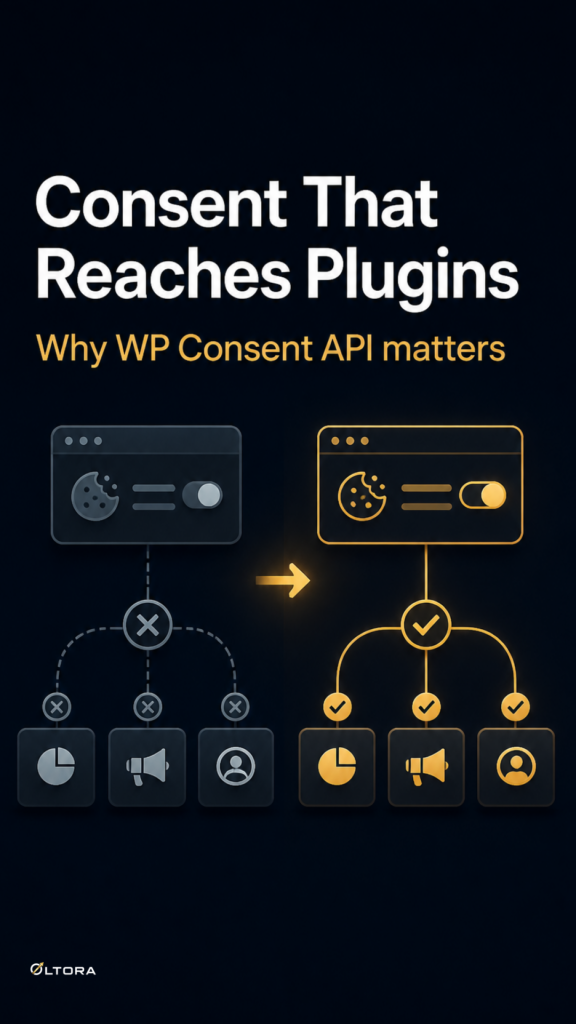
The practical question is not whether a banner appears on the page. It is whether the choice is communicated in a way compatible plugins can understand. That is the role WP Consent API is meant to play: it provides a shared language for consent states inside WordPress, instead of leaving every plugin to invent its own approach.
LCP Cookies Lightning is built around that idea. It acts as the visitor-facing consent manager and sends the saved choice through WP Consent API, so other supported tools can read the result without forcing a separate consent system into the middle of the site.
Why the API matters more than the banner shape
Many site owners think first about banner style: full-screen overlay, slim bar, modal, or popup. Those choices matter for user experience, but they do not solve the deeper problem if the consent state is trapped inside one plugin. Once that happens, you can end up with one tool saying consent was given and another tool behaving as if nothing happened.
WP Consent API reduces that mismatch. It gives compatible WordPress plugins a common way to receive consent categories such as Functional, Preferences, Statistics, Anonymous Statistics, and Marketing. That matters because optional categories should stay optional until the visitor explicitly allows them. A clear API makes that logic easier to keep consistent.
For a site owner, the benefit is practical: one selection can be recognized by multiple compatible parts of the stack, rather than forcing separate banners or duplicate consent rules. That is a better setup than patching together individual scripts that do not speak to each other.
What a lightweight consent manager actually solves
Some consent platforms try to do everything at once: scanning, geolocation, records, vendor management, cloud dashboards, and remote controls. Those features can be useful on the right site. They are not the only reason a cookie banner exists.
A lightweight consent manager focuses on the first mile of the process: show the choice clearly, save it cleanly, and communicate it through the correct API. That narrower job can make sense when the site already has a performance-focused stack and simply needs consent handling that does not introduce unnecessary frontend weight.
- It keeps the consent decision visible without turning the banner into a large interface layer.
- It avoids making the banner the place where every compliance task must live.
- It lets other plugins react to the same saved consent state through WP Consent API.
That division of labor is useful. The banner manages the visitor interaction. The API carries the state. The rest of the site can respond according to the tools you already use.
How Google Site Kit fits in, without becoming the center of the setup
If your site uses Google Site Kit, you may want consent to flow into Google Consent Mode as well. In that case, LCP Cookies Lightning can fit into the chain without replacing Site Kit’s own role. The architecture stays straightforward: visitor choice goes into WP Consent API, and Site Kit can use that state for supported Google services.
That separation matters because it avoids a second competing consent implementation. You are not trying to make two systems tell the same story in two different ways. You are letting one system collect the choice and another system act on it where appropriate.
If you do not use Site Kit, the banner still has a job. WP Consent API remains the shared layer for compatible WordPress plugins. Google tools are optional, not mandatory.
What to watch for when you choose a consent setup
The most useful test is not whether a plugin has the most features. It is whether the consent state remains understandable after installation.
Ask these questions:
- Does the banner communicate the choice through WP Consent API?
- Are optional categories treated as opt-in rather than accepted by default?
- Can the visitor reopen settings later if they want to change the choice?
- Does the setup avoid forcing a second consent system into the same flow?
If the answer to those questions is unclear, the site may still display a banner, but the consent workflow can remain fragmented. That usually creates more maintenance than it saves.
A cleaner consent path is easier to maintain
The value of WP Consent API is not abstract. It makes the consent decision legible to the rest of the WordPress environment. That is the difference between a banner that merely appears and a consent setup that other tools can actually use.
For performance-focused sites, that clarity is especially useful. You can keep the visitor interface compact, use the shared API for communication, and let the rest of the stack respond only where support already exists. That is a more stable model than expecting one plugin to control every third-party script on the internet.
If you need a banner that is intentionally light and built around that workflow, LCP Cookies Lightning keeps the emphasis on the consent message itself and the API that carries it forward.
The result is a simpler question for the site owner: not how many layers the banner adds, but whether the saved choice reaches the tools that need it.