

Oltora Price Monitor – Competitor Price Monitoring Plugin for WordPress
$249/year — billed today and automatically every 12 months until canceled.
Self-hosted competitor price monitoring for WordPress.
Track price increases and decreases across supported WooCommerce and Shopify stores directly from your WordPress dashboard.
- Monitor up to 1,000 competitor products per licensed website
- Track price increases, decreases and price history
- Set independent scan frequencies for each competitor
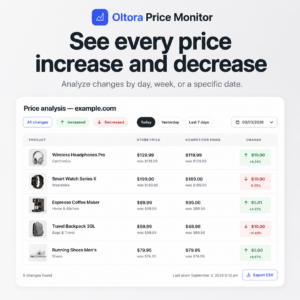
- Analyze changes by day, week, last 30 days or a specific date
- Send daily price-change email summaries to multiple team members
- Export price-change data to CSV
- Keep monitored product and price-history data inside your WordPress database
Annual license required. Includes plugin access, updates and support for 1 year.
Annual subscription. Cancel before your renewal date to avoid the next annual charge.
Description
Self-hosted competitor price monitoring for WordPress
Oltora Price Monitor is a self-hosted WordPress competitor price monitoring plugin for ecommerce teams that want to track price increases and decreases without moving their core monitoring history into another price-monitoring dashboard.
Add supported WooCommerce, Shopify and structured ecommerce websites, choose how often each competitor should be scanned, review product-level price changes and send daily summaries to the people responsible for pricing.
Competitor monitoring · Local WordPress data · Scheduled scans · Price history · Team email digests
Know when competitor prices go up or down
Competitor pricing changes constantly. Checking product pages manually makes it easy to miss a discount, promotion or price increase.
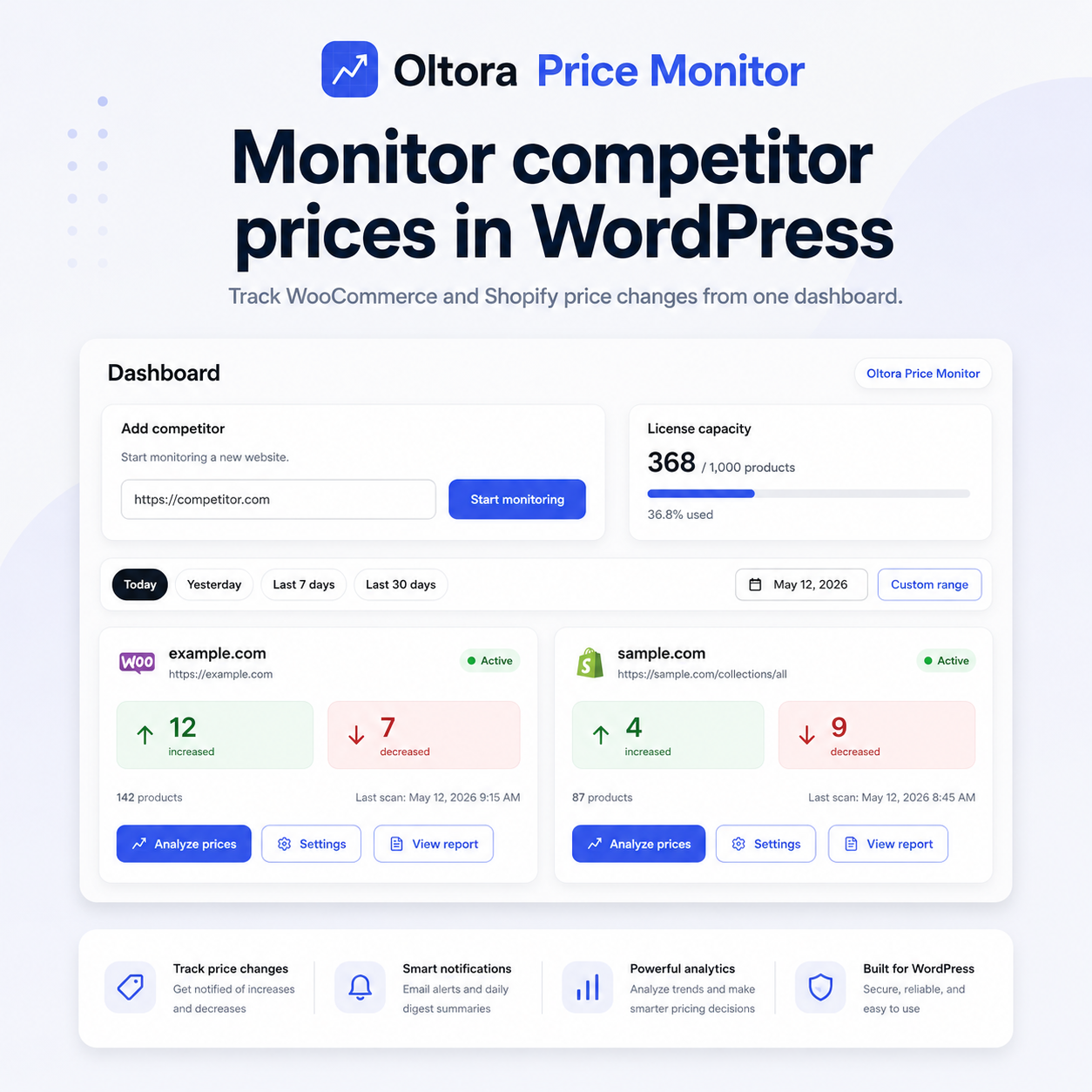
Oltora Price Monitor turns those changes into a clear WordPress dashboard. For every monitored competitor you can see:
- products that increased in price;
- products that decreased in price;
- the number of products currently monitored;
- the last completed scan;
- the detected ecommerce platform when available; and
- your current monitoring capacity.
Filter dashboard activity by Today, Yesterday, Last 7 days, Last 30 days or a specific date.
WooCommerce and Shopify competitor price monitoring
Price Monitor includes dedicated lightweight discovery strategies for compatible WooCommerce competitor stores and Shopify competitor stores, together with structured product-data fallbacks for supported ecommerce pages.
When a store is recognized, the dashboard identifies the detected platform so you can immediately see whether the monitored catalog is WooCommerce, Shopify or a generic supported source.
Detailed price analysis with product images
Open any competitor from the dashboard to inspect individual price-change events.
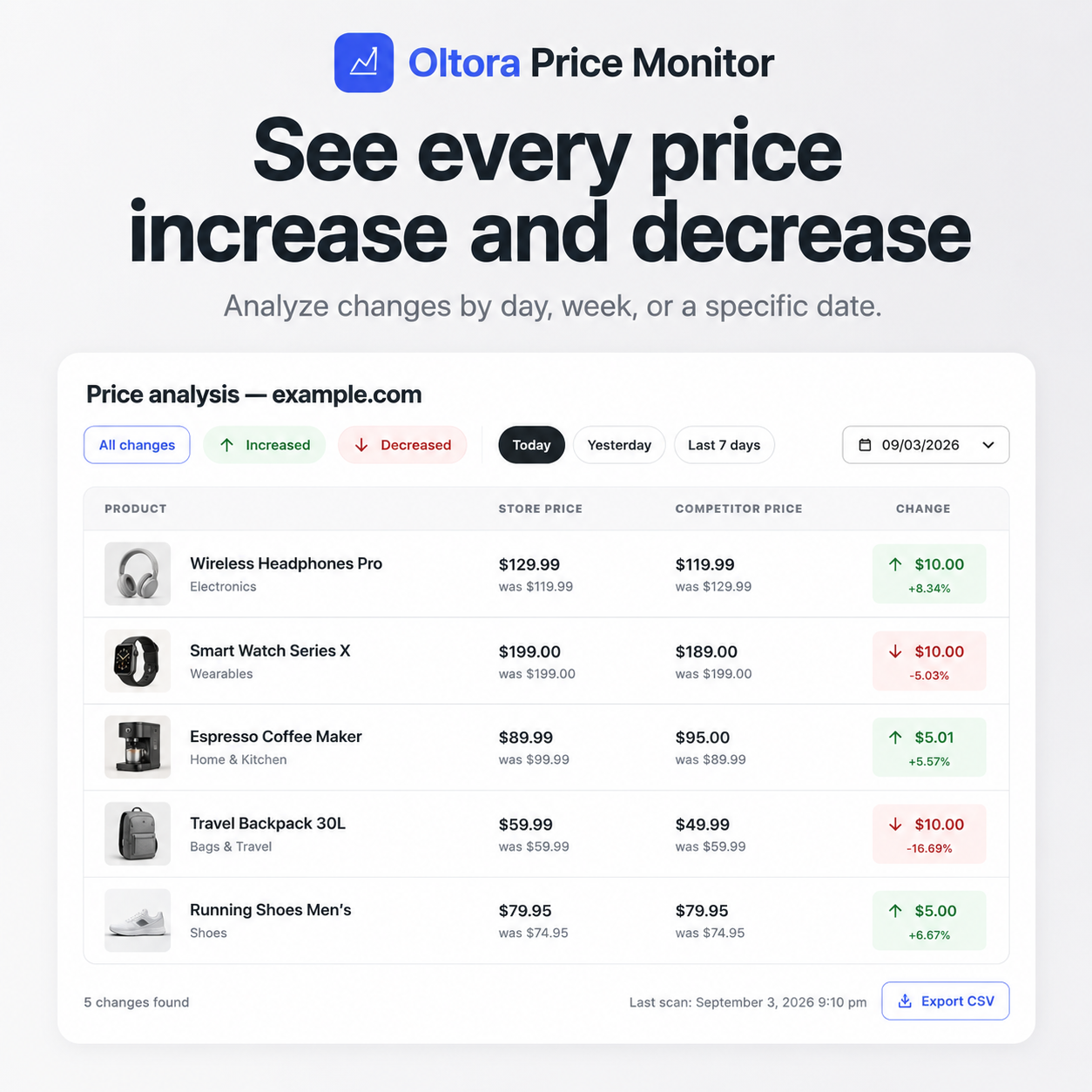
The Price analysis screen can show:
- product thumbnail when the competitor exposes one;
- product name and SKU when available;
- previous competitor price;
- current competitor price;
- absolute price movement;
- percentage change;
- change direction;
- date of the detected change; and
- a direct link to the competitor product page.
Use the All changes, Increased and Decreased filters together with Today, Yesterday, Last 7 days, Last 30 days or a specific date.
Price analysis can also be exported to CSV on demand.
Choose the scan frequency for every competitor
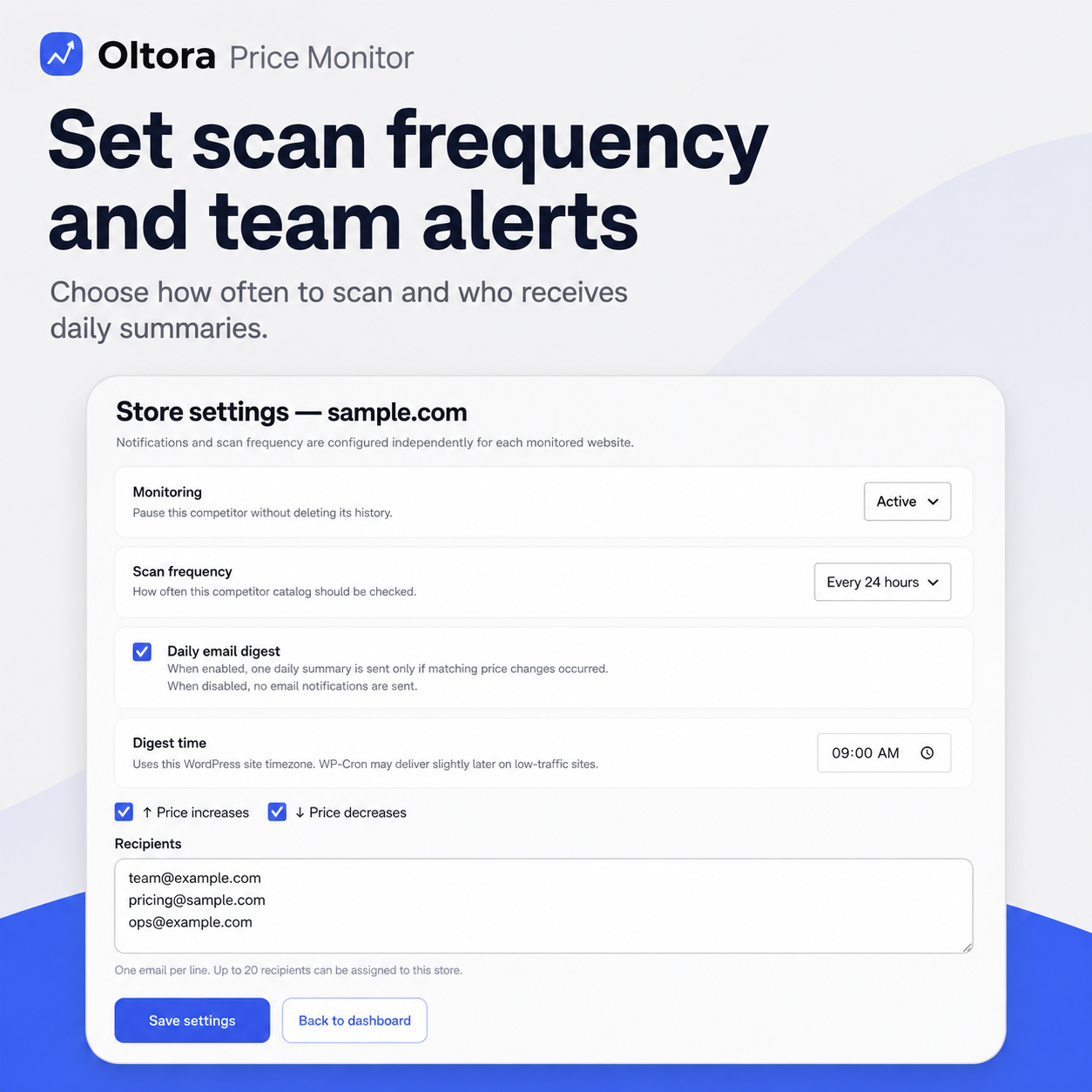
Not every competitor needs the same monitoring schedule. Each store has its own scan-frequency setting.
- Every hour
- Every 3 hours
- Every 6 hours
- Every 12 hours
- Every 24 hours
- Every 48 hours
You can also use Scan now when you want to request a fresh scan manually.
Scheduled scans use the WordPress scheduling environment. Exact execution time can depend on WordPress cron activity and the resources available on the customer’s hosting.
Daily competitor price reports for your team
Notifications are configured independently for each monitored competitor.
For every store you can decide:
- whether the daily email digest is enabled;
- whether to include price increases;
- whether to include price decreases;
- the preferred digest time; and
- which email addresses should receive that store’s report.
Multiple recipients can follow the same competitor. Different competitors can also have completely different recipient lists.
That means your pricing manager, ecommerce manager and commercial team can receive the changes relevant to them without sharing the same WordPress account.
Your competitor price history stays in your WordPress database
Oltora Price Monitor is self-hosted for its core monitoring data.
Monitored stores, product records and detected price-change events are stored in the WordPress database where the plugin is installed.
Oltora does not require a separate hosted competitor-price database for the core local monitoring workflow.
The plugin communicates with Oltora HUB where required for annual license validation, licensed product capacity and private plugin updates.
This architecture is designed for businesses that prefer to keep their competitor-monitoring history under the same WordPress environment they already administer.
1 website or 5 websites
Choose the license size that matches your WordPress setup.
| License | WordPress installations | Included capacity | Annual price |
|---|---|---|---|
| Single Site | 1 | 1,000 monitored products | $249/year launch Regular price $299/year |
| 5 Sites | 5 | 1,000 monitored products per installation | $599/year launch Regular price $749/year |
The 5-site license is one Oltora Price Monitor license with up to five WordPress activations. Each activation has its own standard 1,000-product capacity and can receive its own capacity upgrade.
Need to monitor more than 1,000 products?
The standard license includes 1,000 monitored products per WordPress installation.
Those 1,000 products are shared by all competitor catalogs monitored from that installation. For example:
example.com — 650 monitored products
sample.com — 350 monitored products
Total: 1,000 / 1,000 products
If you need more room, click Upgrade capacity directly from the Price Monitor dashboard or License screen.
The secure upgrade page is created by Oltora HUB and is not listed as a normal public product.
Default capacity upgrade: +1,000 monitored products for $99.
You can increase the quantity to add multiple 1,000-product units, up to the capacity maximum available for that WordPress installation.
Capacity is assigned to the specific WordPress activation that requested the upgrade. This is especially important for 5-site licenses: one site can have 5,000 products while another site can remain at 1,000.
Capacity upgrades expire with the current annual Price Monitor license and do not extend the license term.
Annual license: active access to monitoring, analysis and updates
Oltora Price Monitor uses an annual commercial license.
While the annual license is active you can use:
- scheduled competitor monitoring;
- manual scans;
- price analysis;
- daily email digests;
- licensed product capacity;
- capacity upgrades; and
- private plugin updates.
When the annual license expires, Price Monitor features are paused. Monitoring, analysis, notifications and update access remain unavailable until a new valid annual license is activated.
The local database is not intentionally deleted when the license expires. Renewing or activating a new valid annual license restores access to the plugin features, subject to the capacity included with that active license.
Oltora Price Monitor vs Prisync, PriceMole, Pricefy, MontPrice and StoreSentry
Many competitor price monitoring products are hosted SaaS platforms billed monthly or billed annually at a monthly-equivalent rate. Oltora Price Monitor uses a different architecture: the core monitoring engine and price-history database run inside the customer’s WordPress installation, while Oltora HUB manages the annual commercial license, capacity entitlement and private updates.
| Product / plan | Publicly advertised capacity | Billing shown by provider | Annualized price |
|---|---|---|---|
| Oltora Price Monitor — Single Site | 1,000 monitored competitor products | Annual | ↓ $249/year launch $299 regular annual price |
| MontPrice Enterprise | Up to 1,000 products | $49.99/month | ↑ $599.88/year |
| Prisync Premium — URL Based | Up to 1,000 products | $199/month | ↑ $2,388/year |
| PriceMole Professional | Up to 1,000 products | $199/month | ↑ $2,388/year |
| Pricefy Pro | Up to 2,000 SKUs | $74/month billed annually | ↑ $888/year |
| StoreSentry Growth | 15 competitor stores | $39/month | ↑ $468/year |
Pricing comparison note: public pricing reviewed September 3, 2026.
Why choose the Oltora approach?
- Self-hosted monitoring data: core store, product and price-event records remain in your WordPress database.
- Native WordPress workflow: monitor competitors without living in a separate price-monitoring dashboard.
- Annual commercial license: one annual Price Monitor license instead of another monthly billing cycle.
- Simple interface: price increases, decreases, dates and competitor stores are visible from one focused dashboard.
- Team notifications: assign multiple email recipients independently to each competitor.
- Per-store scan frequency: choose a different schedule for every monitored website.
- Expandable capacity: add capacity to the specific WordPress installation that needs it.
Prisync, PriceMole, Pricefy, MontPrice and StoreSentry are trademarks of their respective owners. Oltora is not affiliated with or endorsed by those companies.
Who is Oltora Price Monitor for?
- WooCommerce store owners
- ecommerce managers
- pricing managers
- online retailers
- digital and ecommerce agencies
- brands monitoring retailers
- manufacturers and distributors
- commercial teams tracking competitor promotions
If competitor prices influence your margins, offers or positioning, Oltora Price Monitor gives you a dedicated WordPress workflow for seeing what changed.
Oltora Price Monitor features
- Self-hosted WordPress competitor price monitoring
- Compatible WooCommerce store monitoring
- Compatible Shopify store monitoring
- Structured product-data fallback
- WooCommerce / Shopify platform badges
- 1,000-product standard capacity per licensed installation
- Per-activation capacity upgrades
- Today, Yesterday, Last 7 days and Last 30 days filters
- Specific-date analysis
- Product thumbnails when available
- Previous and current competitor price
- Absolute and percentage price change
- Direct competitor product links
- On-demand CSV export
- Independent scan frequency per store
- Manual Scan now
- Daily email digest
- Increase / decrease notification filters
- Multiple email recipients per competitor
- Local WordPress price-history database
- Private Oltora plugin updates while the annual license is active
Frequently Asked Questions
What is Oltora Price Monitor?
Oltora Price Monitor is a self-hosted WordPress competitor price monitoring plugin. It checks publicly accessible product data from supported ecommerce websites and records detected price increases and decreases in WordPress.
Does Oltora Price Monitor work with WooCommerce competitors?
Yes, it includes a dedicated strategy for compatible WooCommerce stores that expose the public catalog information required by the plugin.
Can it monitor Shopify competitors?
Yes. Compatible Shopify stores can be monitored when the public catalog information required by Price Monitor is available.
Does it work with every ecommerce website?
No. A local lightweight scanner cannot guarantee compatibility with every website. Stores requiring login, CAPTCHA, private APIs, mandatory browser-side JavaScript or advanced anti-bot systems may not be monitorable.
How many competitor websites can I add?
Price Monitor is primarily limited by the number of active monitored products rather than a fixed competitor-store count. The standard capacity is 1,000 products per licensed WordPress installation.
What happens when 1,000 products are reached?
Existing monitored products remain in the local catalog, but new products cannot be added beyond the active capacity entitlement. Use Upgrade capacity to purchase additional 1,000-product units for that WordPress installation.
How does the 5-site license work?
One 5-site license can activate up to five WordPress installations. Each installation starts with 1,000 monitored products and can receive an independent capacity upgrade.
Where is my competitor price history stored?
Core monitored-store, product and price-change data is stored in the WordPress database where Oltora Price Monitor is installed.
Can multiple employees receive alerts?
Yes. Multiple email recipients can be configured for each monitored competitor, and every competitor can have a different recipient list.
How often can prices be checked?
Each competitor can use its own interval: every hour, 3 hours, 6 hours, 12 hours, 24 hours or 48 hours. Exact timing depends on WordPress cron and hosting availability.
What happens when the annual license expires?
Monitoring, analysis, notifications, capacity upgrades and private updates are paused until a valid new annual license is activated. Existing local monitoring data is not intentionally deleted by license expiration.
Does additional capacity carry into the next annual license?
No. Capacity upgrades belong to the current annual license term and expire with that license. A new annual license starts with the capacity included in the purchased license tier.
Stop checking competitor product pages manually.
Add the competitor once. Let Oltora Price Monitor keep watching while your annual license is active.
Additional information
| License | 1 Website, 5 Websites |
|---|
Related products