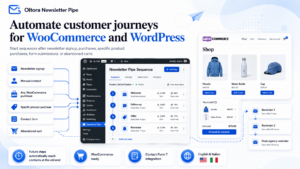
Oltora Newsletter Pipe – WordPress Email Automation Plugin
Original price was: $129.00.$99.00Current price is: $99.00.
A self-hosted WordPress email automation plugin built for email journeys that keep growing.
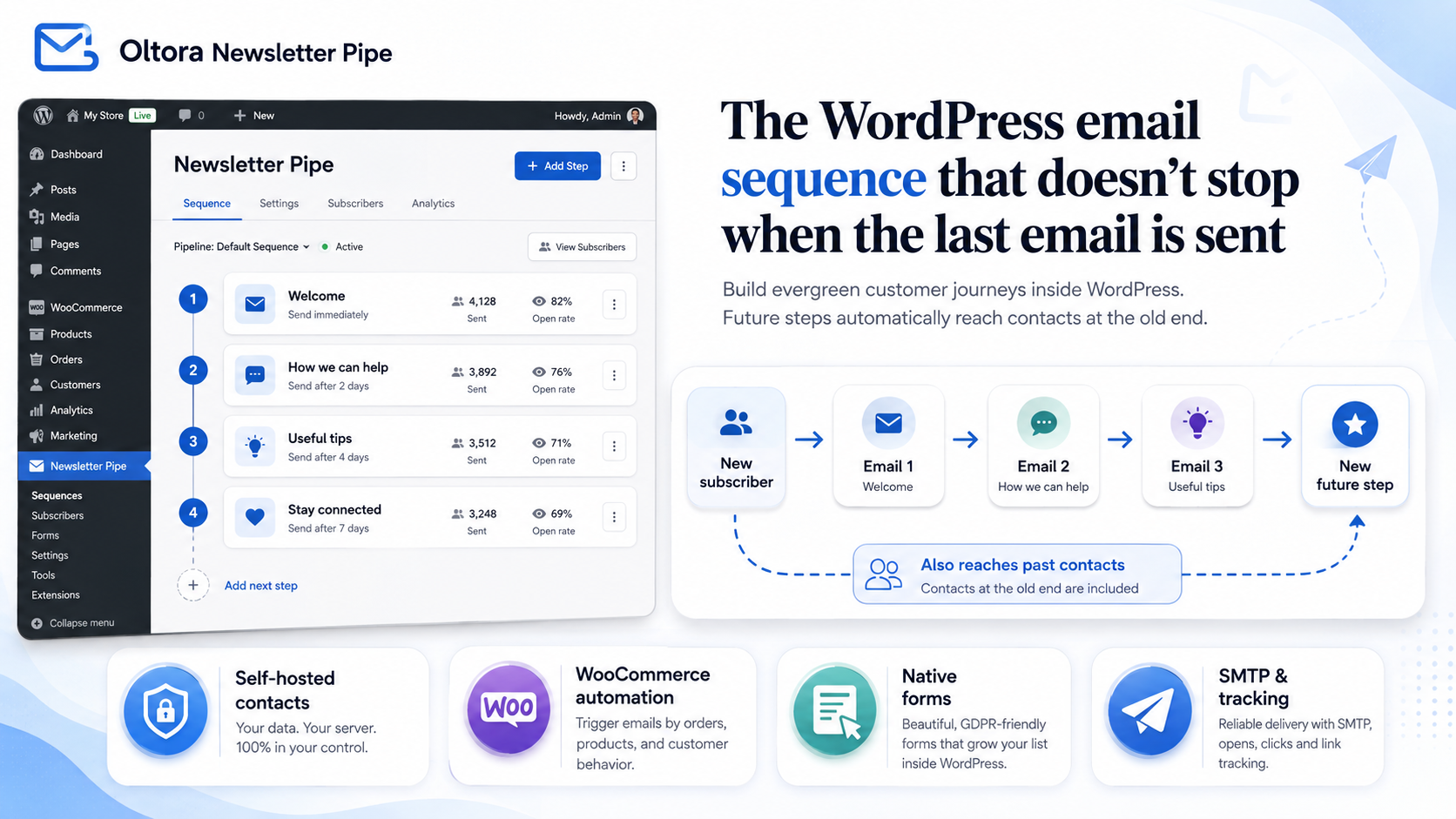
Add new emails anytime and Newsletter Pipe can automatically continue eligible contacts who reached the previous end — without restarting the sequence or resending email steps they already received.
WooCommerce automation · Abandoned cart recovery · Forms · SMTP · Tracking
Description
A WordPress email automation plugin built for journeys that keep growing
Oltora Newsletter Pipe is a self-hosted WordPress email automation and newsletter plugin designed around one simple idea:
your email journey should not permanently end just because a contact reached the last email you had created at that time.
Add a new email tomorrow, next month, or next year and eligible contacts who already reached the previous end can automatically continue into the newly available step.
No restarting completed contacts.
No manually moving people into another sequence.
No resending email steps already recorded in their journey history.
Build your email journey once. Keep extending it as your business grows.
The problem Newsletter Pipe was created to solve
Imagine that you build a WordPress email sequence:
Email 1 → Email 2 → Email 3 → End
Your subscribers or customers receive every email and eventually complete the sequence.
A month later, your business has something new to say.
You create:
Email 4
Your sequence should now be:
Email 1 → Email 2 → Email 3 → Email 4
But what happens to the contacts who already reached the old end?
That is the problem Newsletter Pipe was specifically designed to solve.
Instead of treating those contacts as permanently finished, Newsletter Pipe can recognize that they already received Emails 1, 2 and 3 and continue their journey with the newly available Email 4.
The sequence grows without throwing away the contact’s existing journey history.
Evergreen email sequences that can evolve over time
Newsletter Pipe keeps a history of the email steps associated with each contact’s journey.
For example:
Today:
Email 1 → Email 2 → Email 3
A contact receives all three emails.
One month later:
You add Email 4.
The eligible existing contact can continue with:
Email 4 ✓
A new subscriber still begins with:
Email 1 → Email 2 → Email 3 → Email 4
Later you add Email 5?
The journey can extend again.
This makes Newsletter Pipe especially useful for businesses that continuously create:
- new educational content;
- new products;
- new customer onboarding steps;
- post-purchase information;
- new offers;
- follow-up emails;
- customer retention content; and
- long-term email sequences.
Your business changes. Your email automation can change with it.
Reorder email steps without forgetting what contacts already received
A good email sequence is rarely perfect forever.
You may decide that one email belongs earlier in the journey.
You may create a new email that should appear between two existing steps.
Newsletter Pipe lets you reorder email steps using drag and drop while preserving each contact’s existing email-step history.
If a contact already received a particular step, moving that step to another position does not intentionally make Newsletter Pipe treat it as a completely new email.
Instead, the plugin uses the contact’s journey history to determine which available email steps have not yet been received.
Improve the sequence without automatically starting your existing contacts over from the beginning.
Automatically add contacts to the right email sequence
Each Newsletter Pipe journey can define how contacts enter.
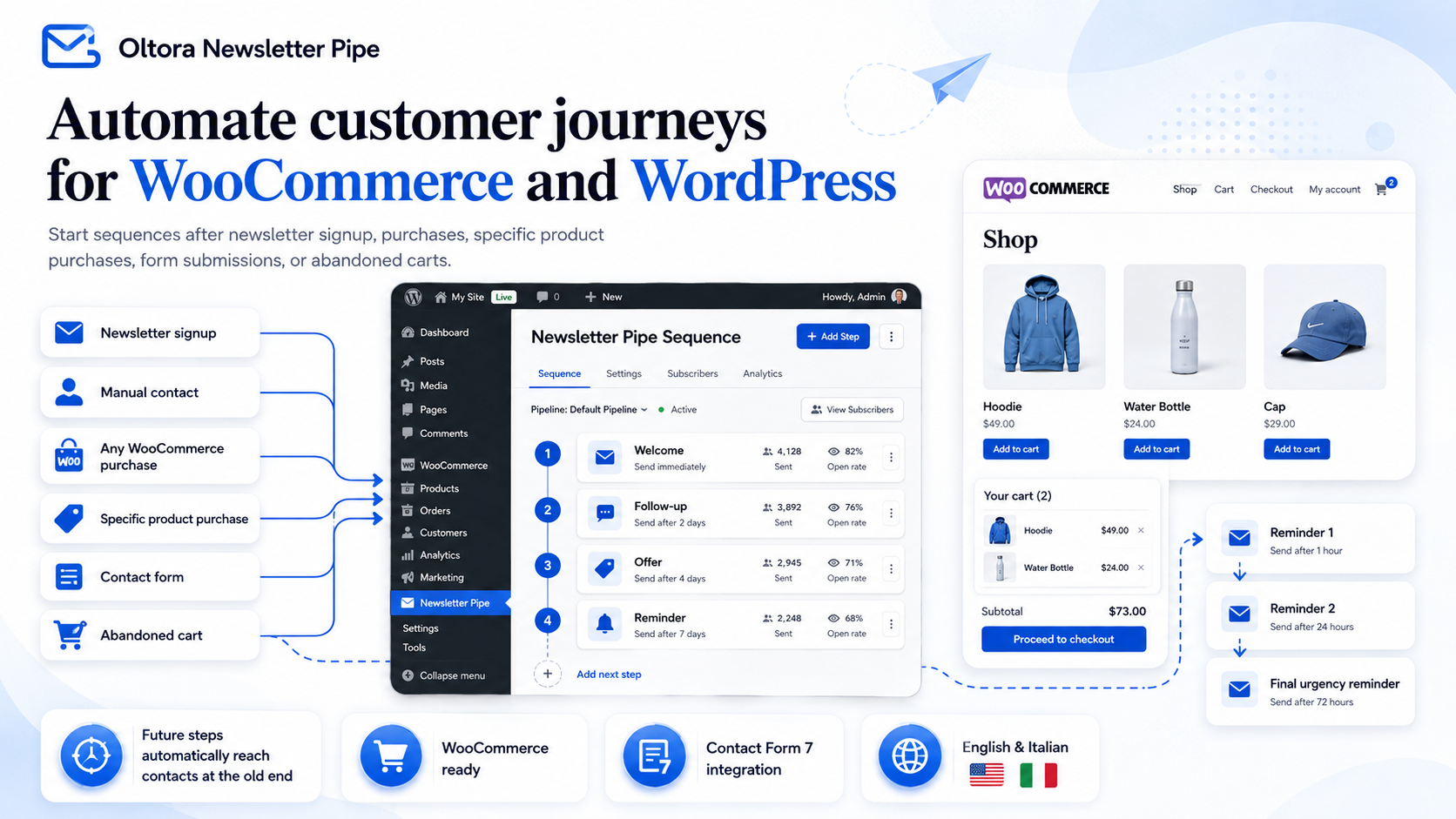
You can start an email sequence when someone:
- subscribes to your newsletter;
- is added manually;
- is imported from CSV or Excel;
- completes a WooCommerce purchase;
- purchases a specific WooCommerce product;
- submits a Newsletter Pipe form; or
- submits a selected Contact Form 7 form.
A sequence can use multiple entry conditions.
If the same person qualifies again, Newsletter Pipe can use that person’s existing journey history rather than blindly restarting previously completed email steps.
WooCommerce email automation inside WordPress
Newsletter Pipe also works as a WooCommerce email automation plugin for customer follow-up journeys.
You can automatically connect customers to sequences after:
- a WooCommerce purchase;
- the purchase of a specific product;
- a newsletter signup;
- a form submission; or
- manual contact creation.
Inside the contact record, you can also view WooCommerce order information associated with that customer.
This makes it possible to create email journeys for:
- customer onboarding;
- post-purchase education;
- product instructions;
- product follow-ups;
- cross-selling;
- upselling;
- repeat-customer communication; and
- long-term customer retention.
Turn WooCommerce purchases into ongoing customer journeys instead of isolated transactions.
WooCommerce abandoned cart recovery
Newsletter Pipe includes abandoned cart email automation for WooCommerce.
When the necessary customer information becomes available during checkout and the purchase is not completed, Newsletter Pipe can use the abandoned checkout event to power a follow-up journey according to your configuration and applicable consent requirements.
A recovery sequence can include:
- an initial abandoned checkout reminder;
- a second follow-up after a delay; and
- a final reminder.
The customer can return to checkout and continue the purchase.
If the order is completed, remaining abandoned cart reminders associated with that recovery journey can automatically stop.
Follow up with unfinished WooCommerce checkouts without manually monitoring every abandoned cart.
Self-hosted WordPress email marketing
Newsletter Pipe is designed as a self-hosted WordPress email marketing solution.
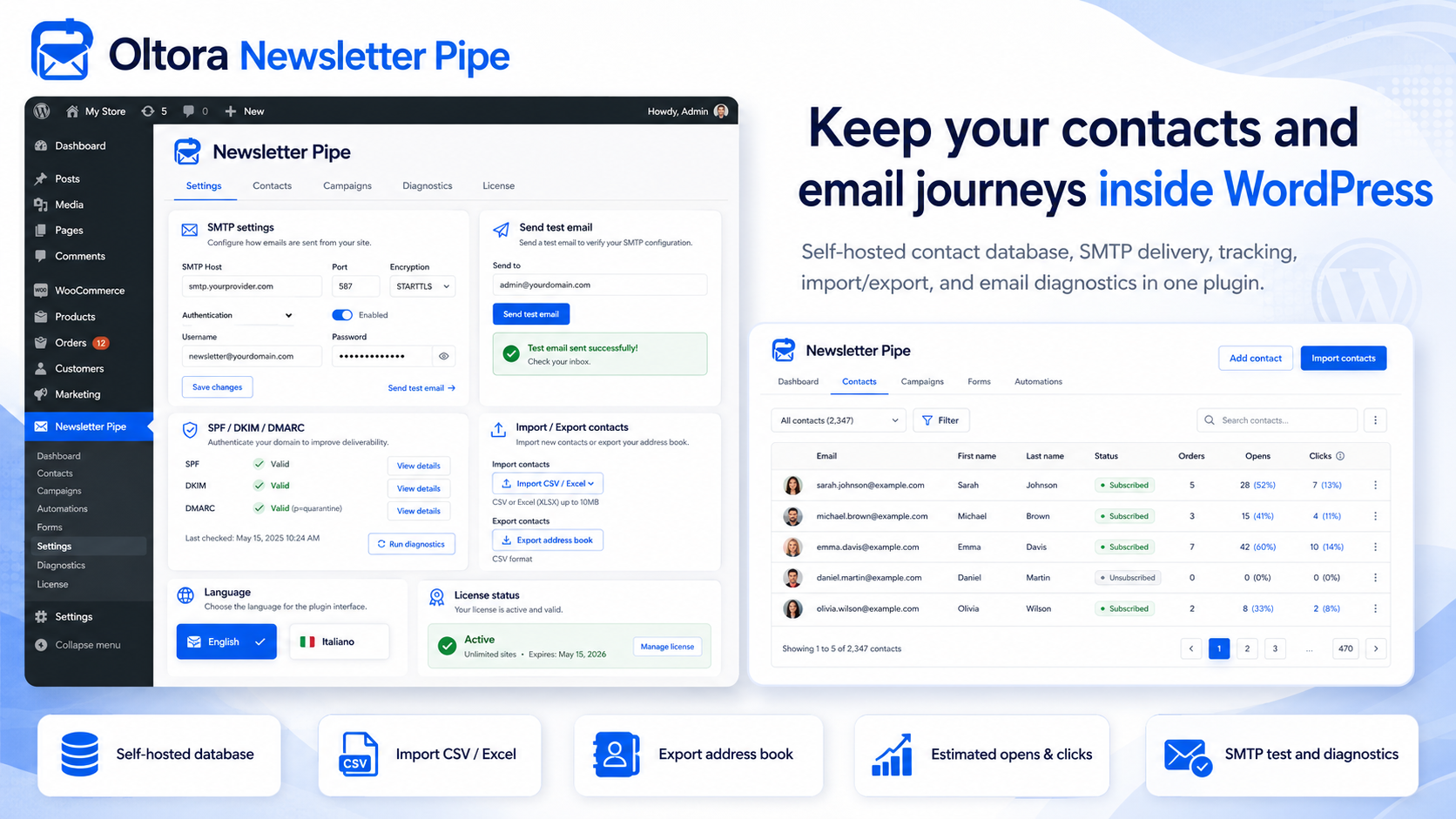
Core Newsletter Pipe information such as contacts, email sequences, journey organization, delivery history, and tracking records is stored in your WordPress environment rather than requiring Oltora to host a separate newsletter contact database for you.
Your WordPress site remains the center of the system.
Depending on the hosting, SMTP provider, email delivery provider, and other integrations you choose, those external services may process the information required to provide their respective services.
Inside Newsletter Pipe you can manage information including:
- email address;
- first name;
- last name;
- subscription status;
- customer categories;
- active email journeys;
- email delivery history;
- estimated opens;
- link clicks; and
- WooCommerce order information.
Create newsletter signup and contact forms in WordPress
Newsletter Pipe includes its own form builder.
You can create:
- newsletter signup forms; and
- contact forms.
Available fields include:
- first name;
- last name;
- email;
- short text fields; and
- long message fields.
You can customize elements including:
- button text;
- text colors;
- field colors;
- button color;
- button text color; and
- success message.
Each form generates a shortcode that you can place on your WordPress site.
Contact Form 7 email automation integration
Already use Contact Form 7?
Newsletter Pipe can connect selected Contact Form 7 forms to your email automation.
When a configured form is submitted successfully, Newsletter Pipe can create or update the contact and connect that person to the selected email sequence according to your settings.
Your existing Contact Form 7 forms can become entry points into automated email journeys.
Import your existing WordPress newsletter contacts
Already have an email list?
Newsletter Pipe supports:
- CSV contact import;
- Excel XLSX contact import; and
- CSV contact export.
A sample import file is available so you can see the expected structure before importing your contacts.
Supported contact information includes:
- email address;
- first name;
- last name; and
- customer category.
You do not have to rebuild your contact database manually just to start using Newsletter Pipe.
Email delivery providers, SMTP settings and WordPress email testing
Newsletter Pipe includes email delivery configuration directly inside WordPress.
You can connect a supported email delivery provider or continue using the SMTP service supplied by your hosting or email provider.
Supported delivery options include:
- Brevo;
- Resend;
- SMTP2GO;
- Amazon SES; and
- Custom SMTP / Hosting SMTP.
For supported providers, Newsletter Pipe can automatically handle standard connection parameters so you can focus on entering the credentials supplied by your email delivery service.
If you prefer to use the email service already included with your hosting or domain provider, you can select Custom SMTP / Hosting SMTP and enter your existing SMTP details.
Once your email provider is configured, you can save the connection, test SMTP authentication, and send a test email directly from Newsletter Pipe.
If you want to use Brevo, follow our complete step-by-step guide to configure Brevo with Oltora Newsletter Pipe. The guide explains how to authenticate your domain, create your Brevo SMTP credentials, connect Brevo to the WordPress plugin, and test your email connection.
Newsletter Pipe also includes diagnostics related to:
- SPF;
- DKIM; and
- DMARC.
These diagnostics can help identify important email-domain configuration issues.
Actual email deliverability and inbox placement also depend on your sending provider, sending reputation, DNS configuration, email content, recipient behavior, sending volume, bounce rates, spam complaints, and other factors outside the plugin’s control.
Email tracking and sequence reports
Each email step includes reporting information so you can better understand what happens after an automated email is sent.
Depending on your configuration and sending provider, you can monitor information including:
- delivery status;
- subscription status;
- estimated opens;
- link clicks;
- unsubscribes;
- failed deliveries;
- bounces; and
- complaint-related information where available.
Open tracking should be treated as an estimate because modern email clients and privacy technologies can affect how open events are recorded.
Clicks and other engagement signals can provide additional information when evaluating the performance of an email step.
Newsletter Pipe vs. traditional WordPress email automation
| Behavior | Oltora Newsletter Pipe | The Newsletter Plugin | MailPoet |
|---|---|---|---|
| Contacts managed from WordPress | Yes | Yes | Yes |
| Automated email sequences | Yes | Yes | Yes |
| WooCommerce-related automation | Yes | Yes | Yes |
| Add a future email after a contact reached the previous end | Designed to continue eligible completed contacts into newly available steps | Official documentation states that completed subscribers do not receive newly added messages unless the series is started again | Existing automation runs remain associated with the automation version they entered |
| Change an active email journey | Per-contact email-step history is preserved | Official documentation warns that inserting or reordering steps in an active series can cause previously sent content to be sent again | Saving changes creates a new automation version; existing runs can continue on their previous version |
| Always-growing evergreen journey | Core product behavior | Completed-series behavior | Version-based active automation behavior |
Comparison reflects publicly documented built-in behavior reviewed on August 11, 2026. Third-party products, plans, documentation, and functionality may change. The Newsletter Plugin and MailPoet are trademarks of their respective owners.
Who is this WordPress email automation plugin for?
Newsletter Pipe is designed for WordPress site owners who want email automation that can continue evolving over time.
It can be a good fit for:
- WooCommerce stores;
- service businesses;
- online educators;
- consultants;
- creators;
- agencies;
- small and medium-sized businesses; and
- WordPress owners looking for a self-hosted newsletter and email automation solution.
It is especially useful if you expect to keep adding new products, lessons, content, offers, onboarding information, or customer follow-ups in the future.
Newsletter Pipe features
Your Newsletter Pipe license includes:
- 1 website license;
- 1 year of plugin updates;
- 1 year of support;
- evergreen email sequences;
- per-contact email-step history;
- drag-and-drop sequence ordering;
- customer categories;
- automatic category-based journey assignment;
- WooCommerce email automation;
- specific-product purchase triggers;
- WooCommerce abandoned cart recovery;
- newsletter signup form builder;
- contact form builder;
- Contact Form 7 integration;
- CSV contact import;
- Excel XLSX contact import;
- CSV contact export;
- email delivery provider configuration;
- Brevo integration;
- Resend integration;
- SMTP2GO integration;
- Amazon SES integration;
- Custom SMTP / Hosting SMTP support;
- SMTP connection testing;
- test-email functionality;
- SPF / DKIM / DMARC diagnostics;
- email engagement tracking; and
- English and Italian interface.
Newsletter Pipe pricing
Launch price: $99 for the first year
Renewal: $129/year
The standard license includes:
- 1 WordPress website;
- 1 year of plugin updates; and
- 1 year of support.
Newsletter Pipe can continue running on your website after the license period expires.
An expired license does not include access to future versions, plugin updates, or support until the license is renewed.
Eligible first-time purchases made directly through Oltora are covered by our 14-day refund policy.
Frequently Asked Questions
What is Newsletter Pipe?
Newsletter Pipe is a self-hosted WordPress email automation plugin for creating automated email sequences, managing contacts, connecting WooCommerce events, recovering abandoned carts, collecting subscribers through forms, and tracking email engagement.
Its defining feature is the ability to extend an existing journey with future email steps while preserving the history of what each contact already received.
What makes Newsletter Pipe different from a traditional WordPress newsletter plugin?
Newsletter Pipe was specifically built around what happens after a contact reaches the current end of an email sequence.
When you later add another email, eligible contacts who completed the previous journey can continue into the newly available step without being intentionally restarted from Email 1.
Can I add new emails after a sequence is already running?
Yes.
That is one of the primary purposes of Newsletter Pipe.
You can extend the journey over time and eligible contacts who reached the previous end can continue into newly available email steps.
Will existing contacts receive all the old emails again?
Newsletter Pipe maintains a history of the email steps associated with each contact.
That history is used when determining which available email should come next instead of intentionally treating every returning contact as completely new.
Can I reorder an active email sequence?
Yes.
Email steps can be reordered using drag and drop while Newsletter Pipe preserves the existing per-contact email-step history.
Does Newsletter Pipe work with WooCommerce?
Yes.
Newsletter Pipe can use WooCommerce purchases and specific-product purchases as journey entry conditions, display WooCommerce information associated with contacts, and manage abandoned cart recovery.
Does Newsletter Pipe recover abandoned WooCommerce carts?
Yes.
Newsletter Pipe includes an abandoned cart journey that can automatically send configured checkout reminders and stop remaining reminders when the associated order is completed.
Can I import existing subscribers?
Yes.
Newsletter Pipe supports CSV and Excel XLSX contact imports.
Can I export my contacts?
Yes.
Contacts can be exported to CSV.
Does Newsletter Pipe include signup forms?
Yes.
You can create newsletter signup forms and contact forms directly inside the plugin.
Does Newsletter Pipe integrate with Contact Form 7?
Yes.
Selected Contact Form 7 forms can be configured as entry points into Newsletter Pipe journeys.
Is Newsletter Pipe self-hosted?
Newsletter Pipe’s core contact and journey data is stored in your WordPress environment.
External providers you choose to connect, such as SMTP, email delivery, hosting, or other services, may process information required to provide their respective services.
Do I need an SMTP or email delivery provider?
Newsletter Pipe includes email delivery and SMTP configuration directly inside WordPress.
You can use the SMTP service supplied by your hosting or email provider, or connect a supported external email delivery service such as Brevo, Resend, SMTP2GO, or Amazon SES.
If you want to use your existing hosting email service, select Custom SMTP / Hosting SMTP and enter the credentials supplied by your provider.
If you want to use Brevo, follow our Brevo setup guide for Oltora Newsletter Pipe to authenticate your domain, create your SMTP credentials, connect Brevo to the plugin, and test the connection.
Can I use the same email address for sending and receiving?
Yes.
You can use the same company email address as your sender and Reply-To address while continuing to receive replies through your existing mailbox provider.
The email delivery provider used by Newsletter Pipe handles outgoing messages, while your existing email service can continue handling incoming mail.
Can I change email delivery provider later?
Yes.
You can return to the Newsletter Pipe settings and select another supported provider or switch back to Custom SMTP / Hosting SMTP.
Changing the active provider inside Newsletter Pipe does not necessarily require moving your existing mailbox.
Does Newsletter Pipe track email opens and clicks?
Newsletter Pipe provides email engagement information including estimated opens and link clicks where available.
Open statistics should be considered estimates because email-client privacy features can affect open tracking.
Does using Brevo, Amazon SES or another provider guarantee Inbox delivery?
No.
No plugin or email delivery provider can guarantee that every message will be placed in a recipient’s primary Inbox.
Inbox placement can depend on authentication, sender reputation, domain reputation, sending volume, message content, recipient engagement, bounce rates, spam complaints, and filtering decisions made by services such as Gmail, Outlook, and Yahoo.
What happens when my license expires?
The installed plugin can continue running.
Access to future plugin versions, updates, and support stops until the license is renewed.
Can I use one license on multiple websites?
The standard Newsletter Pipe license described on this page covers one WordPress website.
Does Newsletter Pipe have a refund period?
Eligible first-time plugin purchases made directly through Oltora are covered by a 14-day refund period in accordance with Oltora’s Refund, Cancellation and Returns Policy.
Your next email should not require a new customer journey.
Your business will have something new to say.
A new product.
A new lesson.
A better onboarding email.
A new offer.
A follow-up you had not thought of when you built the original sequence.
Your email automation should be able to evolve with your business.
Build the journey once.
Extend it when you have something new to add.
Let eligible existing contacts continue from what they have already received.
Oltora Newsletter Pipe — the self-hosted WordPress email automation plugin built for customer journeys that keep growing.
Related products